What are Functional Interfaces ?
Functional interfaces contain only one abstract method.
Below are thumb rules :
- Only one abstract method is allowed (Also called SAM – Single Abstract Method)
- Any number of default methods are allowed.
- Any number of static methods are allowed.
- Any number of private methods are allowed.
Since functional interfaces has only one abstract method, we can write lambda code/pass the implementation behavior of it using lambda code.
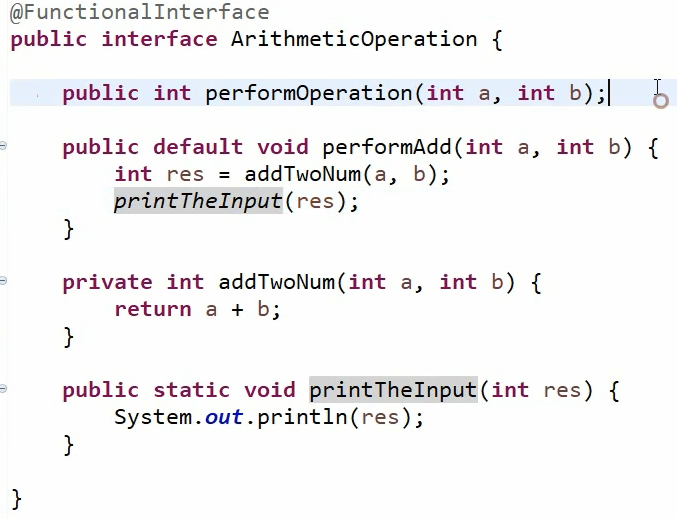
In Java 8, a new annotation @FunctionalInterface has been introduced to mark an interface as Functional Interface. However this is not mandatory.
Wit this, if any one try to add another abstract method, compiler will throw an error.
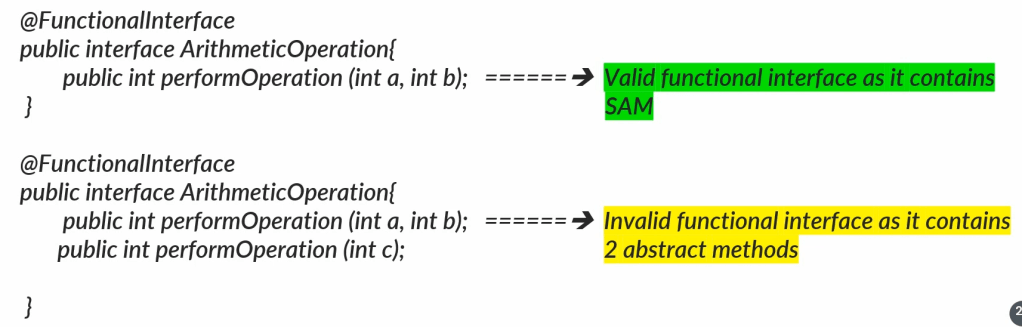

Java already has some interfaces similar to functional interfaces even before Java 8. Those are like :
- Runnable — it contains only one abstract method run()
- Comparable — it contains only 1 abstract method compareTo()
Functional Interface with Inheritance
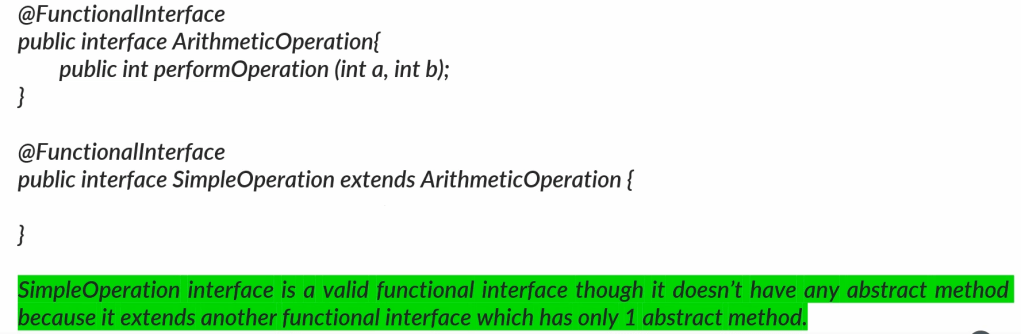
Even though SimpleOperation functional interface does not have any abstract method, it is still valid because it is inheriting from ArithmeticOperation functional interface.
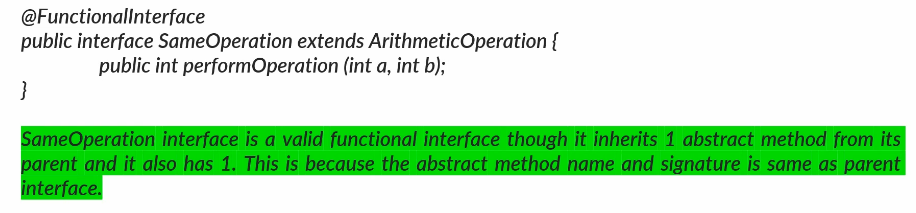
If a functional interface extends another functional interface and declares another abstract method, it is invalid. Because through parent interface it already has one abstract method. Having another abstract method violates the rule of SAM.

Pre-defined Functional Interfaces
Java 8 has provided some pre defined functional interfaces by considering most common requirements during the development.
All such interfaces are present inside ‘java.util.function’ package. Few of the most commonly used functional interfaces.
- java.util.function.Predicate<T>
- java.util.function.Function<T>
- java.util.function.Consumer<T>
- java.util.function.Supplier<T>
- java.util.function.BiPredicate<T>
- java.util.function.BiFunction<T>
- java.util.function.BiConsumer<T>
- java.util.function.UnaryOperator<T>
- java.util.function.BinaryOperator<T>
- Primitive Functional interfaces
Predicate Functional Interface
What is Predicate functional Interface
Predicate Functional interface handles the scenarios where we accept an input parameter and return the boolean after processing the input.
java.util.Function.Predicate<T> — @param<T> : the type of the input to the function.
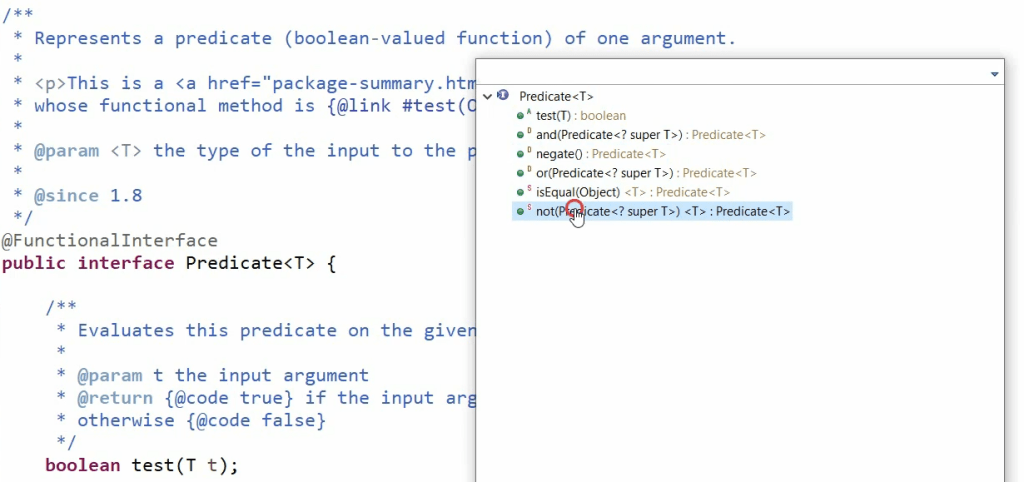
In Java, a Predicate is a functional interface that represents a single argument function that returns a boolean value. It is part of the java.util.function package and is commonly used in functional programming scenarios, such as filtering or matching conditions in streams and collections.
The Predicate interface is annotated with @FunctionalInterface, which means it has only one abstract method:
@FunctionalInterface
public interface Predicate<T> {
    boolean test(T t);
}
boolean test(T t): Single abstract method available. This is the primary method of the Predicate interface. It takes an argument of type T and returns a boolean indicating whether the input satisfies the predicate condition.
This functional interface test your given input object based upon the logic that you provided and will return a boolean value.
Predicate<Integer> isEven = (n) -> n % 2 == 0; <-- the logic I provide

System.out.println(isEven.test(4)); // true <-- tests your given input
System.out.println(isEven.test(7)); // false
The Predicate functional interface is a powerful tool for functional programming in Java, allowing for concise and readable code when dealing with conditions and filtering.
Since functional interface can have any number of default and static methods, so Predicate also has some utility methods.
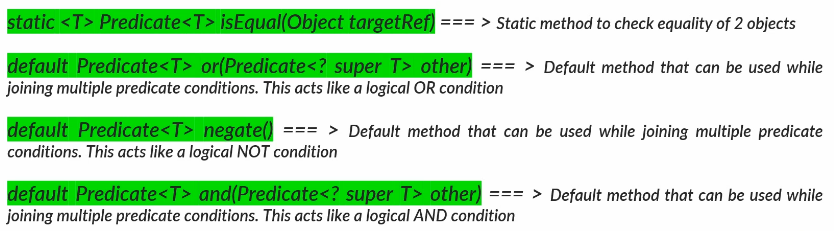
–> default methods like or, negate and and, we will use them if you want to chain/join multiple lambda expressions using Predicate functional interface.
Creating a Predicate
I have created an implementation of predicate that accept an integer and it’s implementation is to check whether the given integer is an even or not.
// Creating a predicate
Predicate<Integer> isEven = i -> i % 2 == 0;
So now isEven holds the behavior of, validating a given input, whether it is a even or not, and returning a boolean value.
Calling the predicate method
// Calling predicate method
System.out.println("Is the number 61 is even? " + isEven.test(61));
Chaining of predicates
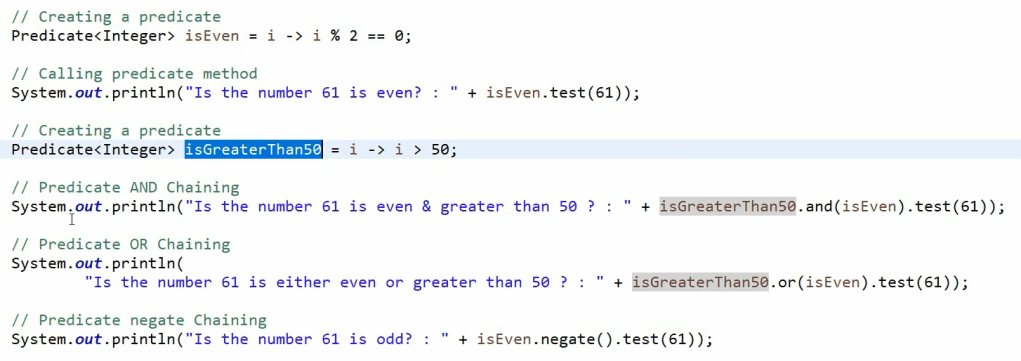
Usage of Predicate inside collections and streams
Predicates are often used in conjunction with Java Streams for filtering data.
List<Integer> numbers = Arrays.asList(1, 2, 3, 4, 5, 6);
List<Integer> evenNumbers = numbers.stream()
                                   .filter(isEven)
                                   .collect(Collectors.toList());

System.out.println(evenNumbers); // [2, 4, 6]
isEqual(Object targetRef): Returns a predicate that tests if two arguments are equal according to Objects.equals(Object, Object).
Predicate<String> isHello = Predicate.isEqual("Hello");

System.out.println(isHello.test("Hello")); // true
System.out.println(isHello.test("World")); // false
Inside your project, when you are using Java 8, if there is a requirement like taking a POJO object and checking some functionality and returning a boolean value, definitely leverage Predicate to reduce your code.
Function functional interface
In Java, a Function is a functional interface that represents a function that takes one argument and produces a result. It is part of the java.util.function package and is widely used in functional programming, particularly in operations like mapping, transforming data, and applying custom logic in streams.
–> if you have a scenario where you want to pass some input and after processing business logic, you want to return a any data type, then Function is the most optimal functional interface to use in those scenarios.
Function is similar to Predicate except with a change that instead of boolean it can return any datatype as outcome. It represents a function that accepts one argument and produces a result.
@FunctionalInterface
public interface Function<T, R> {
    R apply(T t);
}
T: The type of the input to the function.R: The type of the result of the function.
apply(T t): This is the primary method of the Function interface. It takes an argument of type T and returns a result of type R.
Function<String, Integer> lengthFunction = (s) -> s.length();

System.out.println(lengthFunction.apply("Hello")); // 5
System.out.println(lengthFunction.apply("World")); // 5
identity(): Returns a function that always returns its input argument.
Function<String, String> identityFunction = Function.identity();

System.out.println(identityFunction.apply("Test")); // "Test"

Creating a Function functional interface
// Creating a Function
Function<String, String> convertStr = input -> input.toUpperCase();
Calling Function method
// Calling Function method
System.out.println("The uppercase value of given input : " + convertStr.apply("Hello");
andThen() function
andThen(Function<? super R, ? extends V> after): Returns a composed function that first applies this function to its input, and then applies the after function to the result.
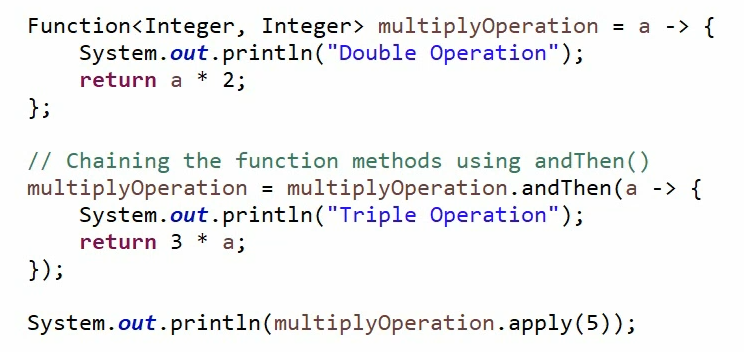
The output is : (5 * 2) * 3 = 30
compose(Function<? super V, ? extends T> before): Returns a composed function that first applies the before function to its input, and then applies this function to the result.
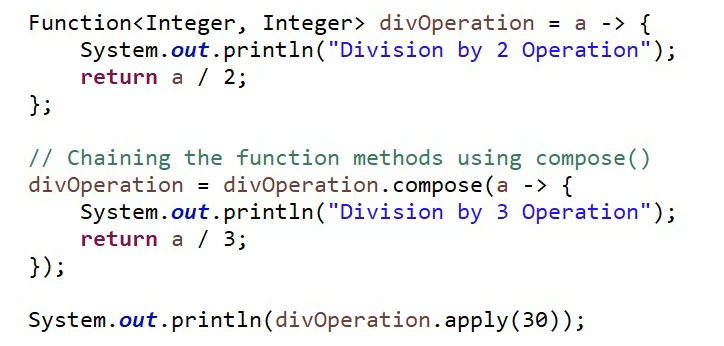
The output will be : (30 / 3) / 2 = 5
Using in Streams
The Function interface is often used in streams to transform data.
List<String> words = Arrays.asList("one", "two", "three");
List<Integer> lengths = words.stream()
                             .map(lengthFunction)
                             .collect(Collectors.toList());

System.out.println(lengths); // [3, 3, 5]
The Function functional interface is an essential part of Java’s functional programming capabilities, enabling you to create and combine functions that transform data, making your code more modular, concise, and readable.
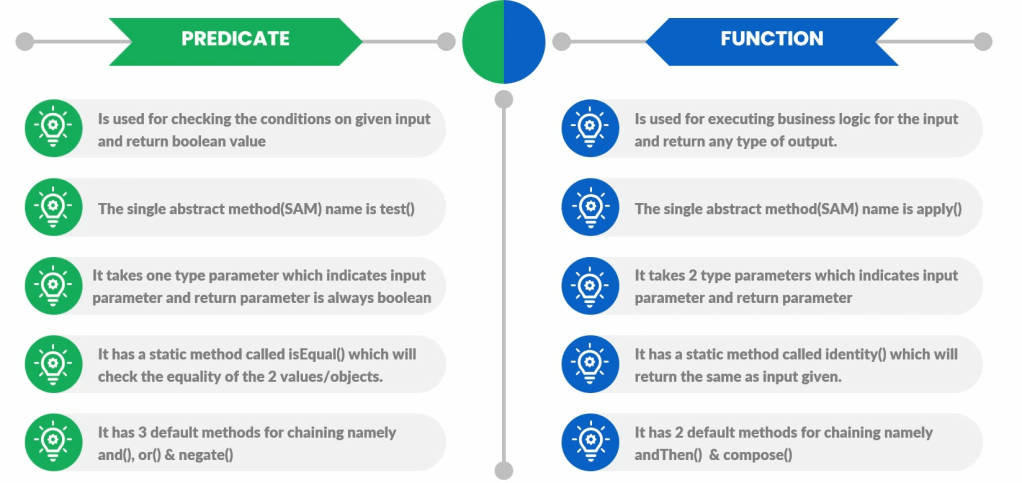
Predicate V/s Function
UnaryOperator Functional interface
It is very similar to Function functional interface. In fact this is a child of Function interface. The only difference between unary operator and function interface is unary operator.
As it indicates, if you have a scenario where both input and output parameters data type is same, then instead of using Function<T, R>, we can use the unary operator which will accept same data type input and output parameter.
The UnaryOperator is a specialized version of the Function functional interface in Java. It represents an operation on a single operand that returns a result of the same type as its operand.
UnaryOperator is part of the java.util.function package and is commonly used for operations like incrementing, negating, or any other transformation where the input and output types are the same.
The UnaryOperator interface extends the Function interface:
@FunctionalInterface
public interface UnaryOperator<T> extends Function<T, T> {
    // It inherits the apply method from Function<T, T>
}
Since it is a child of Function<T, T>, so all the methods apply(), compose(), andThen(), identity() are available inside UnaryOperator interface also.
apply(T t): Inherited from Function. It takes an argument of type T and returns a result of the same type T.
// Creating a Function
Function<String, String> convertStr = input -> input.toUpperCase();

// Calling function  method
System.out.println("Upper case value of given input " + convertStr.apply("Hello");

// Creating UnaryOperator function
UnaryOperator<String> upperStr = input -> input.toUpperCase();

// Calling function method
System.out.println("Upper case value " + upperStr.apply("Bye"));

// Another example
UnaryOperator<Integer> square = (n) -> n * n;

System.out.println(square.apply(5)); // 25
System.out.println(square.apply(3)); // 9
Using with Streams
UnaryOperator is often used in streams for transformations that keep the data type consistent.
UnaryOperator<Integer> square = (n) -> n * n;

List<Integer> numbers = Arrays.asList(1, 2, 3, 4);
List<Integer> squaredNumbers = numbers.stream()
                                      .map(square)
                                      .collect(Collectors.toList());

System.out.println(squaredNumbers); // [1, 4, 9, 16]
The UnaryOperator functional interface is a convenient way to represent operations that take a single input and return a result of the same type. It simplifies the use of functions where the input and output types are identical, making your code more readable and expressive in functional programming scenarios.
Consumer Functional interface
The Consumer functional interface in Java is part of the java.util.function package and represents an operation that accepts a single input argument and returns no result.
It is typically used to perform side effects, like modifying an object, logging information, or printing to the console, without returning any value.
The Consumer interface is annotated with @FunctionalInterface, which means it has only one abstract method:
@FunctionalInterface
public interface Consumer<T> {
    void accept(T t);
}
T: The type of the input to the operation.
accept(T t): This is the primary method of the Consumer interface. It takes an argument of type T and performs the operation without returning any value.
Consumer<String> printConsumer = (s) -> System.out.println(s);

printConsumer.accept("Hello, World!"); // Prints "Hello, World!" to the console
andThen(Consumer<? super T> after): Returns a composed Consumer that performs, in sequence, the operation of this Consumer followed by the operation of the after Consumer. This method can be used for chaining.
Consumer<String> printConsumer = (s) -> System.out.println(s);
Consumer<String> greetConsumer = (s) -> System.out.print("Hello, ");

Consumer<String> printWithGreet = greetConsumer.andThen(printConsumer);

printWithGreet.accept("John"); // Prints "Hello, John" to the console
Usage in Streams
Consumer is commonly used in streams, especially with the forEach method, to perform operations on each element of a collection.
Consumer<String> printConsumer = (s) -> System.out.println(s);
List<String> names = Arrays.asList("Alice", "Bob", "Charlie");

names.forEach(printConsumer);
// Prints:
// Alice
// Bob
// Charlie
The Consumer functional interface is a powerful tool for performing operations on objects without needing to return a result. It is widely used in Java for tasks such as logging, printing, modifying objects, and applying operations across collections or streams.
Supplier Functional interface
Supplier interface will always return a value of data type without accepting any input.
–> Think of a scenario where you want to generate a OTP to be sent to your customer. So for such scenarios you have written a lambda code which will not accept anything but will return a OTP value as an output. So that can be one of the classic example of supplier functional interface.
The Supplier functional interface in Java is part of the java.util.function package. It represents a supplier of results, meaning it provides a result of a specified type without taking any input.
It is typically used in scenarios where you need to generate or supply values on demand, such as in lazy evaluation or factory methods.
@FunctionalInterface
public interface Supplier<T> {
    T get();
}
T: The type of the result supplied by this supplier.
get(): This is the only abstract method of the Supplier interface. It returns a result of type T.
Supplier<String> stringSupplier = () -> "Hello, World!";

System.out.println(stringSupplier.get()); // Prints "Hello, World!"
The Supplier interface is useful in various scenarios, such as creating default values, providing data for lazy evaluation, or generating complex objects when needed.
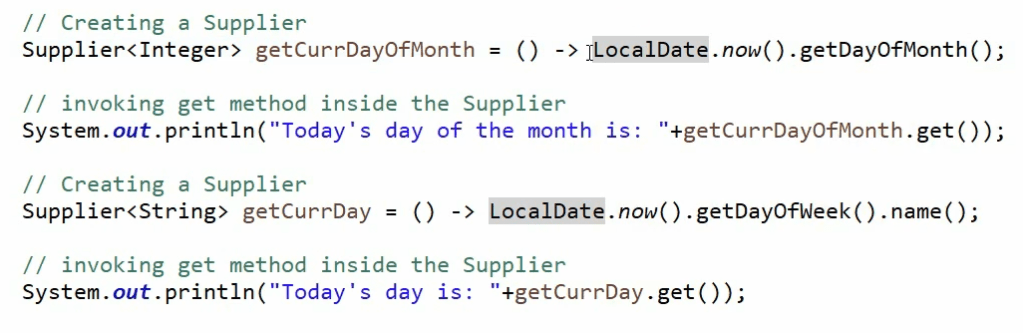
Example: Generating Random Values
A common use of Supplier is to provide random values:
Supplier<Double> randomSupplier = () -> Math.random();

System.out.println(randomSupplier.get()); // Prints a random double value
The Supplier functional interface is a versatile tool in Java’s functional programming toolkit, useful for generating values on demand, lazy evaluation, and supplying default or complex values. Its simplicity and flexibility make it a key component in various functional programming scenarios.
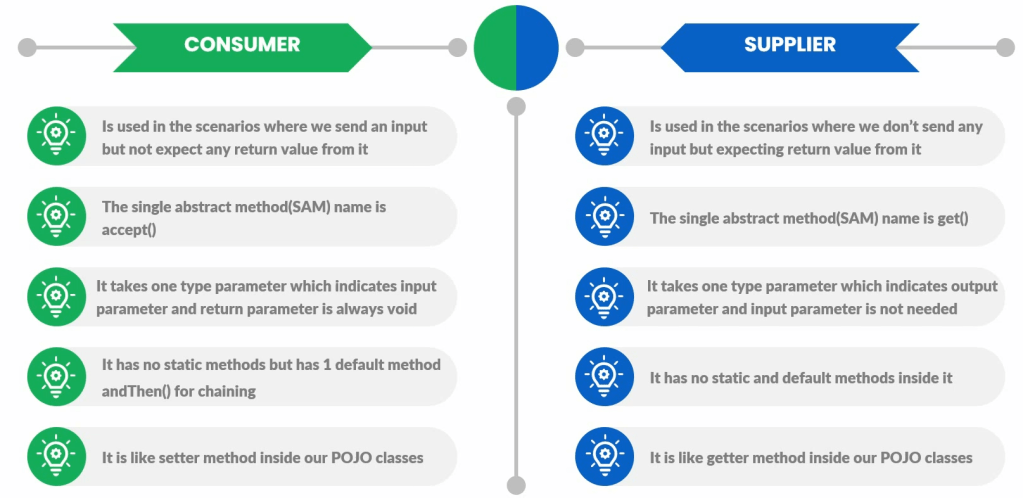
Consumer v/s Supplier functional interfaces
Bi Functional Interfaces
What if we need to send 2 input parameters to functional interfaces. To address the same, Java has Bi Functional interfaces.
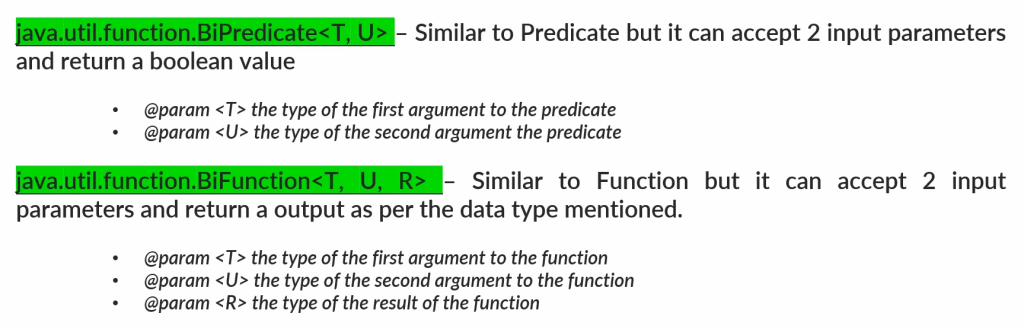
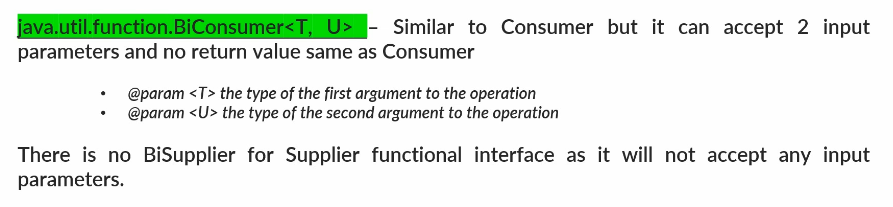
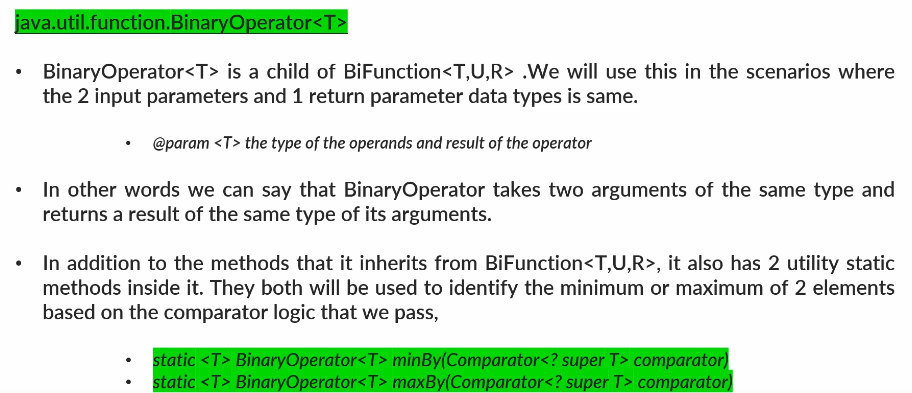
BiPredicate examples :
BiPredicate<Integer, Integer> isSumGreaterThanTen = (a, b) -> (a + b) > 10;

System.out.println(isSumGreaterThanTen.test(4, 7)); // true
System.out.println(isSumGreaterThanTen.test(3, 5)); // false
Example
import java.util.*;
import java.util.function.*;
import java.util.stream.*;

public class BiPredicateExample {
    public static void main(String[] args) {
        List<int[]> pairs = Arrays.asList(
            new int[]{3, 4},
            new int[]{5, 7},
            new int[]{6, 5},
            new int[]{2, 9}
        );

        BiPredicate<Integer, Integer> isSumGreaterThanTen = (a, b) -> (a + b) > 10;

        List<int[]> filteredPairs = pairs.stream()
            .filter(pair -> isSumGreaterThanTen.test(pair[0], pair[1]))
            .collect(Collectors.toList());

        for (int[] pair : filteredPairs) {
            System.out.println(Arrays.toString(pair));
        }
        // Output:
        // [5, 7]
        // [6, 5]
        // [2, 9]
    }
}
Primitive type Functional interfaces
Java provides a set of functional interfaces specifically designed for primitive types, which help avoid the overhead associated with autoboxing and unboxing when working with functional programming. These primitive functional interfaces are similar to their generic counterparts but are tailored to handle primitive types directly.
 Bits, Bytes and Brains