Introduction
Streams API is a more powerful feature that will help us to achieve more results with a less code and at the same time it will also allow you to process the data parallelly without worrying about Multithreading concepts.
In Java 8, java.util.Stream interface got introduced.
–> The idea of Stream API is is to help us in processing the sequence of objects that we usually stored inside the collections.
Ex: Like you may be storing a list of employee objects inside an array list, You might be storing some list of key and values inside a HashMap. So all such data which we are storing inside the collections, we can process them or we can write a business logic by looping them in a more efficient manner without writing lots and lots of code using loops.
Stream API is part of java.util package.
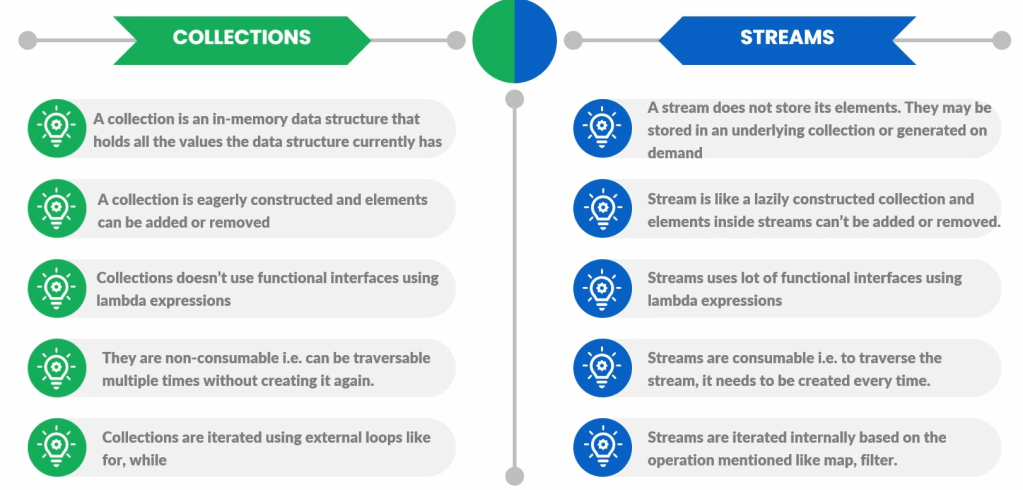
Collection means, it can be list, set, map, linked list, etc. So it can be anything which is representing the group of similar objects as a single entity. Whereas streams will be used to process a group of objects present inside a collection.
Example :
I have a code which will load all the employee details present inside the database. And if you have 1000 employees in my organization, I will get a thousand employee details inside a list that is a collection.
Whereas coming to streams, the streams will help us to process all those thousand employee objects which are staying inside a collection with the help of utility methods present inside it, which leverages Lambda expressions to a great extent.
–> Streams will help us to process the group of objects presence inside a collection.

We can create a stream of objects from a collection, create using an array of elements or using an iterator.
Stream is an interface, introduced in Java 1.8 and is part of java.util.stream package. So whatever classes available inside the stream package, we call them Streams API.
–> Stream API can be used to process data inside your collections.
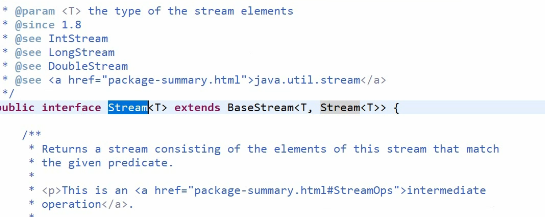
<T> inside this interface declarations tells that, it can process any kind of object like you can give Employee object, Product objects or list of string anything it will take. That’s why Java team represented this as a generic value.
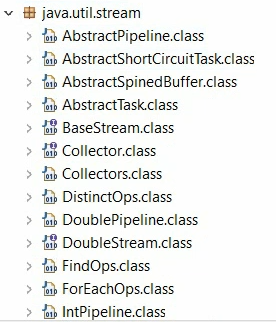
java.util.stream package contains multiple classes and we call all those classes as Streams API.
Stream interface has many utility methods for different operations, which will help us to process data by writing less code leveraging Lambda expressions..
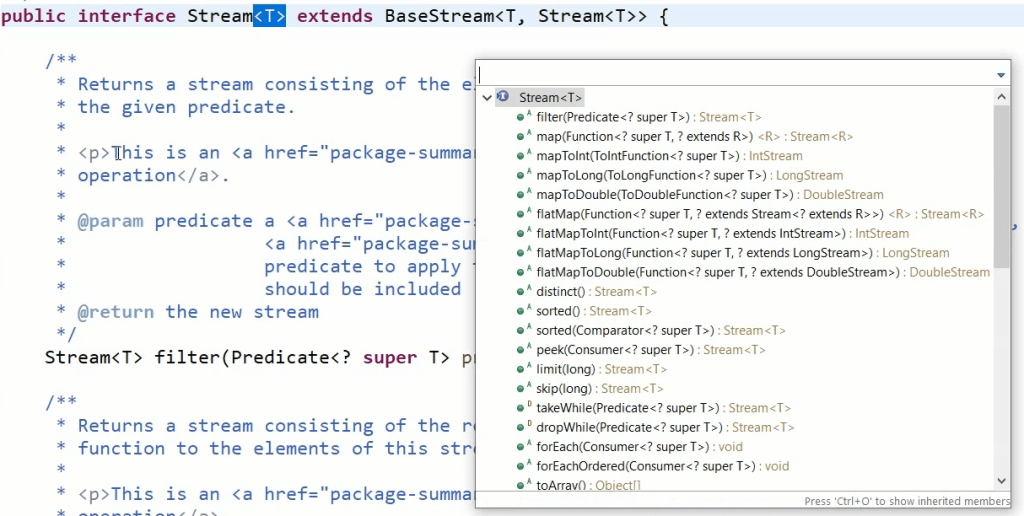
These are all various important methods that it has which will help us to process data by writing less code leveraging Lambda expressions.
Create Stream objects
Create a Stream object from Collection
We can create a stream using either by calling stream() method introduced in all the collections to support streams (or) with the help of Stream.of() method.
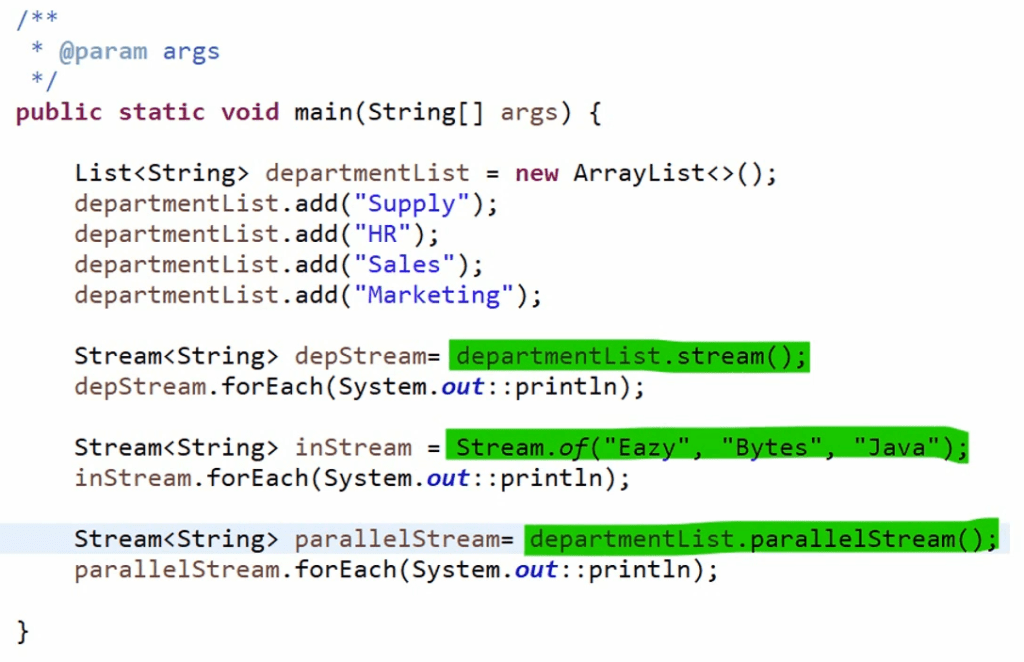
– I can get a stream from the list by just calling stream() method inside collection.
Once I call the stream() default method, I will get now a stream representation of all these elements present inside the collection.
NOTE – Please do remember stream will never store its elements. So stream is not a memory location.
Even when you say I formed a stream from the list of array elements or list of input elements, but still those values will be still staying inside a collection, whatever you are holding.
— collection will always hold the data of the elements, whereas stream is just a representation of those elements. Collection is a physical holding of the elements, whereas Stream is just a representation of those elements.
Stream will never ever hold the data.
Stream operations don’t mutate their source. Instead, they return new streams that hold the result.
Creating a Stream object from brand new elements
We can use Stream.of() method to create a stream from a brand new elements.

You may have a question like, where do these values “Eazy”, “Bytes”, “Java” get stored? No, they are not storing inside the stream. They will be storing inside the string pool memory location that we have inside Java.
Stream API allows you to process data parallelly.
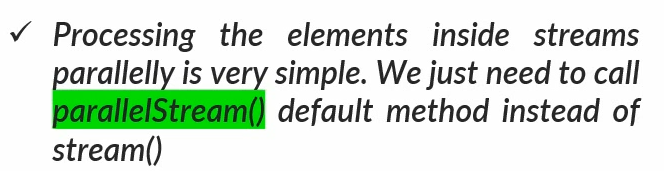

You just have to call parallelStream() method whenever you want to process your data parallelly.
Very important – NOTE
Stream operations never, ever mutate their source. Instead, they return new streams that hold the results.
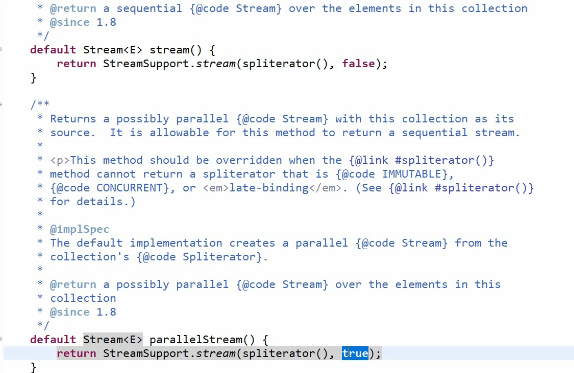
Inside Collection interface, we have these default methods introduced since Java 1.8.
Code example
package com.rndayala.streamsapi;

import java.util.ArrayList;
import java.util.List;
import java.util.stream.Stream;

public class StreamsCreations {

	public static void main(String[] args) {
		List<String> departmentList = new ArrayList<>();
		departmentList.add("Supply");
		departmentList.add("HR");
		departmentList.add("Sales");
		departmentList.add("Marketing");

		Stream<String> depStream = departmentList.stream();
		depStream.forEach(System.out::println);

		Stream<String> inStream = Stream.of("Eazy", "Bytes", "Java");
		inStream.forEach(System.out::println);

		Stream<String> parallelStream = departmentList.parallelStream();
		parallelStream.forEach(System.out::println);

                // creating an empty stream
		Stream<String> emptyStream = Stream.empty();
		emptyStream.forEach(System.out::println); // nothing is printed
	}
}
forEach() method accepts a Consumer interface — This is a functional interface that represents an operation that accepts a single input argument and returns no result.
Streams – Pipeline of Operations
We can use streams to process data inside collections. So whenever we want to process data, we might have a multiple requirements to process the data. And definitely having only one method or one operation on streams may not be feasible.
We may want to have a series of operations that needs to be performed on the streams to process the data. So for such scenarios we can form a pipeline of operations.
Usually, pipeline will have 3 different kind of operations.
- Creating a stream from existing collection or elements, using stream() method, Stream.of() method or parallelStream() method.
- We can perform one or more intermediate operations transforming the initial stream into others or filtering data based on some criteria etc.
- Applying a terminal operation to produce a result.
Intermediate operations — the purpose of these operations is that they will help you maybe to transform the given input to something else based upon our business logic, or to filter the given data based upon certain criteria.
intermediate operations have methods like map, flatmap, filter, etc. So these are all the utility methods available inside Streams API, which will allow you to perform any intermediate operations on your data.
Terminal operation — your stream will never hold the data physically. Instead, it will rely on the original collection or the collection that it is going to create after processing the data. So in order to create the collection after processing the data or to produce a result, we use terminal operations.
Convert an array into a Stream
You can also convert the given array of elements to streams and to achieve the same, there are 2 static methods has been added to java.util.Arrays class.

There might be a scenario where you have 100 elements inside your array, but you want to create a stream from the 30th element to 60th element. In such scenarios, definitely you can use the second method.
Infinite Stream
To generate an infinite stream of elements which is suitable for stream of random elements. Stream has 2 static methods. If you use these methods, definitely you will get an infinite number of streaming like it will keep on sending the random input numbers to your stream and using those numbers, you can process them at some point of time if you want.
Stream generate(Supplier<T> s) returns an infinite sequential unordered stream where each element is generated by the provided Supplier. This is suitable for generating constant streams, streams of random elements, etc.
static <T> Stream<T> generate(Supplier<T> s)

Where, Stream is an interface and T is the type of stream elements.
s is the Supplier of generated elements and the return value is a new infinite sequential unordered Stream.
import java.util.Random;
import java.util.stream.Stream;

public class InfiniteStream {
	public static void main(String[] args) {
		// using Stream.generate() method
		// to generate 5 random Integer values
		Stream.generate(new Random()::nextInt)
                               .limit(5)
                               .forEach(System.out::println);
	}
}
In above example, Stream.generate() will keep on sending the random input numbers to your stream and using those numbers, you can process them.
map() method
map() is one of the intermediate operations available inside Streams API and mostly used method inside streams.
So map() method is used in the scenarios where we need to apply a business logic based upon the given input to transform the data that we receive.
Like think of a scenario, where from database I’m getting a list of employee objects and inside my business logic, for each employee I have to identify whether a given employee is staying with the organization from more than ten years or not. So definitely this need a business logic inside your code.
— as the name indicate, map() method means it will try to give an input, mapped to a different value after processing your business logic.
My business requirement is, I want to transform all my department names into uppercase. So in such scenarios, definitely I want to transform my given input based upon given business logic, which is converting them to uppercase.
So in this scenario, definitely I can use map() method.
NOTE – please remember map() is an intermediate operation. That means post map() method, you will again get a stream of new objects. Initially you will give a stream of input objects and after executing your business logic you will again get an another stream with a new elements inside it. So, due to that reason it will be called as a intermediate operation.
–> Since we are giving an input and taking an output of any data type, map() method, accept lambda representation of Function functional interface.
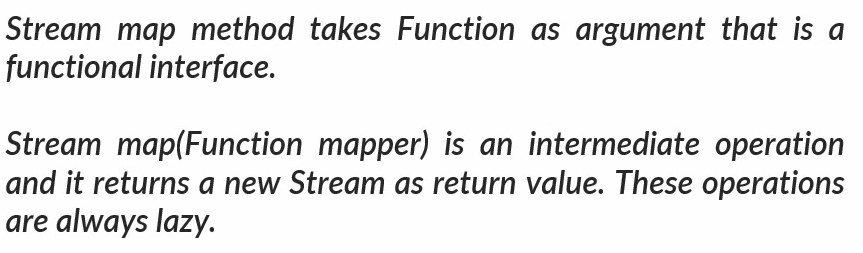
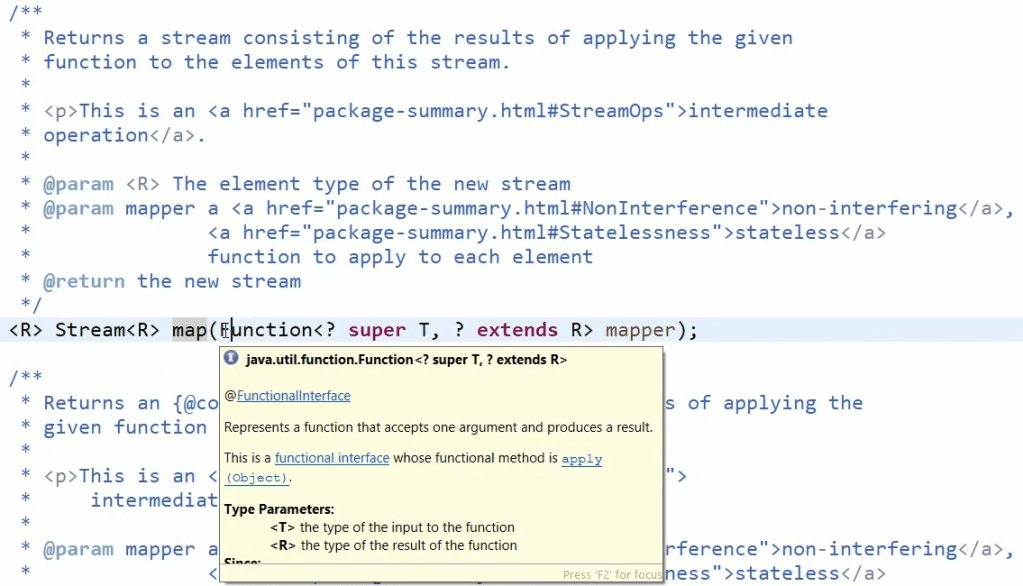
map() method takes a Function that accepts one argument and produces a result.
package com.rndayala.streamsapi;

import java.util.ArrayList;
import java.util.List;
import java.util.stream.Stream;

public class StreamMapMethod {

	public static void main(String[] args) {
		List<String> departmentList = new ArrayList<>();
		departmentList.add("Supply");
		departmentList.add("HR");
		departmentList.add("Sales");
		departmentList.add("Marketing");

		Stream<String> depStream = departmentList.stream();
		depStream.map(word -> word.toUpperCase())
                             .forEach(word -> System.out.println(word));
	}
}
forEach is a terminal operation, and will help you in collecting the data and printing it as per your current business logic.

Whatever operations that we perform inside map() are lazy in nature. What I mean when I say lazy is, until unless you are going to call that stream() and execute that lambda expression, the elements inside your collection will not be transformed as per your business logic.
Stream operations don’t mutate their source, your original list will never be affected. Instead, after converting, they will give a new stream of object which you can eventually convert into a collection and perform your business logic using a terminal operation.
flatmap() method in Stream API
The flatMap() method in the Java Stream API is used to transform each element of a stream into a new stream and then flatten all those streams into a single stream.
flatmap() method used in the scenarios where sometimes you ended up with multiple streams post map() method like usually from map() method, after processing the given business logic, you are expecting a stream out of it, but sometimes we may get stream of streams like you’ll get different streams or a stream of streams, which is like two level of streams. To process your data using a terminal operation, you may need a single stream.
In such scenarios, to flat your streams into a single stream, instead of getting a stream of streams or multiple streams, we can use flatmap() method which will flatten all my streams into a single stream.
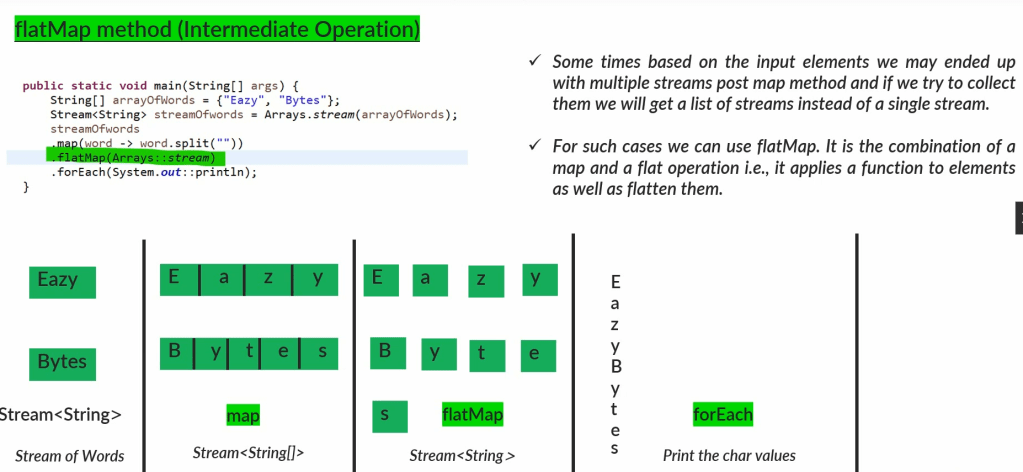
Use flatMap() when each element of the stream itself becomes a stream, and you want to merge all those streams into one big stream. It “flattens” the structure, so you don’t end up with nested streams.
List<String> sentences = Arrays.asList("Hello world", "Java is fun", "Stream API");

List<String> words = sentences.stream()
    .flatMap(sentence -> Arrays.stream(sentence.split(" "))) // Split each sentence into words and flatten
    .collect(Collectors.toList());

System.out.println(words);
// Output: [Hello, world, Java, is, fun, Stream, API]
Anytime if you have a scenario, where you ended up having multiple streams post map(), then in such scenarios you can use flatmap() method to flatten those multiple streams into a single stream and on top of that you can apply terminal operation to process your data.
filter() method in Streams API
If we have a scenario where we need to exclude certain elements inside a collection based on a condition, we can use filter() method inside streams to process them.
The filter() method in the Java Streams API is used to select elements from a stream that match a given condition(Predicate).
It effectively filters out elements that don’t satisfy the condition, allowing you to work only with the elements that do.
You provide a condition (a Predicate), and filter() goes through each element in the stream, keeping only those that pass the condition.
–> The purpose of filter() method is to keep only the elements in the stream that meet a certain condition, and discard the rest.
–> Stream filter() method takes Predicate as argument that is a functional interface which can act as a boolean to filter the elements based on the condition defined.
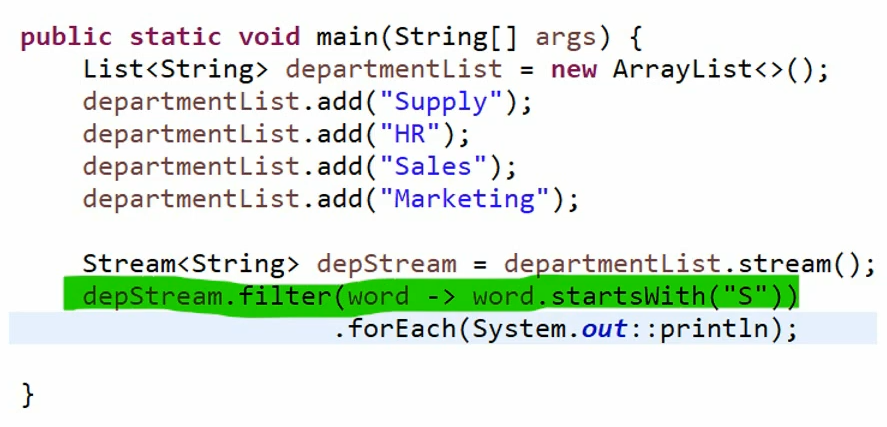
Example :
List<Integer> numbers = Arrays.asList(1, 2, 3, 4, 5, 6, 7, 8, 9, 10);

List<Integer> evenNumbers = numbers.stream()
    .filter(n -> n % 2 == 0)  // Keep only even numbers
    .collect(Collectors.toList());

System.out.println(evenNumbers);
// Output: [2, 4, 6, 8, 10]
Notes :
filter()is used when you want to narrow down a stream to only those elements that meet a specific condition.- It doesn’t modify the original stream but creates a new stream with the filtered elements.
- The condition is typically provided as a lambda expression or method reference that returns a boolean value (
truefor elements to keep,falsefor those to discard).
limit() method in Streams API
The limit() method in the Java Stream API is used to truncate a stream, keeping only the first n elements and discarding the rest. This can be especially useful when you only need a subset of the stream’s data.
We used this method to reduce the number of elements in a stream to a specified number.
You specify the maximum number of elements you want to keep, and limit() will give you a new stream containing only the first n elements.

Here in this example, we used Stream.generate() method to provider random integer numbers. But since generate() method will provide infinite stream of numbers, we limit it to only first 10 elements.
Example :
Suppose you have a list of numbers, and you want to get only the first 3 elements.
List<Integer> numbers = Arrays.asList(1, 2, 3, 4, 5, 6, 7, 8, 9, 10);

List<Integer> firstThree = numbers.stream()
    .limit(3)  // Keep only the first 3 elements
    .collect(Collectors.toList());

System.out.println(firstThree);
// Output: [1, 2, 3]
Notes :
limit(n)is used to keep only the firstnelements of a stream.- It is useful for working with a portion of a stream’s data.
- The method creates a new stream with only the specified number of elements, without modifying the original stream.
skip() method in Stream API
The skip() method in the Java Stream API is used to discard the first n elements of a stream, and return a new stream that starts from the element immediately after the skipped elements.
–> if the stream has fewer than n elements, an empty stream is returned.
The purpose of this method is to ignore a specified number of elements from the beginning of a stream.
You specify the number of elements to skip, and skip() returns a stream that starts after those elements.
Example :
Suppose you have a list of numbers, and you want to ignore the first 4 elements and work with the rest.
List<Integer> numbers = Arrays.asList(1, 2, 3, 4, 5, 6, 7, 8, 9, 10);

List<Integer> afterSkip = numbers.stream()
    .skip(4)  // Skip the first 4 elements
    .collect(Collectors.toList());

System.out.println(afterSkip);
// Output: [5, 6, 7, 8, 9, 10]
Usage scenario — When you want to ignore a known number of initial elements, for example, to analyze data from a certain point onwards.
Notes :
skip(n)is used to discard the firstnelements of a stream.- It creates a new stream that starts after the skipped elements, without modifying the original stream.
- It’s often used in scenarios where you want to ignore a portion of the data or implement pagination in processing streams of data.

In the above code, we skipped first 10 elements, and limit it to only 20 numbers. The output of this method will be the numbers from 11…30.
distinct() method in Streams API
The distinct() method in the Java Stream API is used to remove duplicate elements from a stream, returning a stream that contains only unique elements. It determines duplication of elements by using Object.equals(Object) method.
The purpose of this method is to filter out duplicate elements and keep only the unique ones.
The distinct() method checks each element in the stream, and if an element has already appeared before, it is removed from the resulting stream.
Example :
Suppose you have a list of numbers with some duplicates, and you want to get a list of only the unique numbers.
List<Integer> numbers = Arrays.asList(1, 2, 2, 3, 4, 4, 5);

List<Integer> uniqueNumbers = numbers.stream()
    .distinct()  // Remove duplicates
    .collect(Collectors.toList());

System.out.println(uniqueNumbers);
// Output: [1, 2, 3, 4, 5]
The distinct() method iterates through the stream and removes any elements that have already appeared.
Usage Scenarios:
- Removing Duplicates: Whenever you need to ensure that the data you’re working with contains no duplicates,
distinct()is the go-to method. - Data Cleaning: Useful in data processing tasks where you want to clean up a dataset by removing repeated entries.
Notes :
distinct()is used to eliminate duplicate elements from a stream.- It creates a new stream with only unique elements, based on their
equals()method. - It’s often used in scenarios where uniqueness is important, such as in data cleaning or when processing sets of data.
sorted() method in Streams API
The sorted() method in the Java Stream API is used to sort the elements of a stream according to a specified order. It can sort elements in their natural order or according to a custom comparator you provide.
The purpose of this method is to arrange the elements of a stream in a specific order.
The sorted() method processes the elements of a stream and returns a new stream where the elements are sorted.
Types of Sorting:
- Natural Order Sorting:
- Sorts elements according to their natural order (e.g., numbers in ascending order, strings in alphabetical order).
- Example: Sorting a list of numbers in ascending order.
- Custom Order Sorting:
- Sorts elements according to a custom order that you define using a
Comparator. - Example: Sorting a list of strings by their length.
- Sorts elements according to a custom order that you define using a
Examples:
1. Natural Order Sorting
Suppose you have a list of numbers, and you want to sort them in ascending order.
List<Integer> numbers = Arrays.asList(5, 2, 8, 1, 3);

List<Integer> sortedNumbers = numbers.stream()
    .sorted()  // Sort in natural order (ascending)
    .collect(Collectors.toList());

System.out.println(sortedNumbers);
// Output: [1, 2, 3, 5, 8]
2. Custom Order Sorting
Suppose you have a list of strings, and you want to sort them by their length.
List<String> words = Arrays.asList("apple", "banana", "pear", "kiwi");

List<String> sortedWords = words.stream()
    .sorted(Comparator.comparingInt(String::length))  // Sort by string length
    .collect(Collectors.toList());

System.out.println(sortedWords);
// Output: [pear, kiwi, apple, banana]
How It Works:
- Natural Order: When you call
sorted()with no arguments, it sorts the elements in their natural order (e.g., numbers from smallest to largest, strings alphabetically). - Custom Comparator: When you call
sorted(Comparator), you can define a custom sorting order (e.g., by length, reverse order, etc.).
Usage Scenarios:
- Data Organization: Sorting data before further processing or displaying it.
- Custom Sorting Needs: When the natural order isn’t suitable, and you need a specific sorting criteria.
Summary:
sorted()is used to sort the elements of a stream.- It can sort in natural order or according to a custom comparator.
- The method returns a new stream with the elements sorted, leaving the original stream unchanged.
- It’s useful in scenarios where the order of elements matters, such as when preparing data for presentation or further analysis.
peek() method in Stream API
The peek() method in the Java Stream API is used to perform an operation on each element of the stream as it is being processed, without changing the stream itself. It’s primarily used for debugging or performing side effects.
Like sometimes you may have a requirement where you want to see how my intermediate operations are processing the data. In such scenarios, you can use peek() method as an intermediate operation.
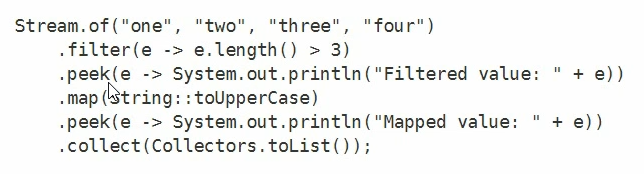
Simple Explanation
- Purpose: To “peek” at each element in the stream and perform some action (like logging, modifying external states, etc.) without altering the stream’s content.
- How It Works: You provide a
Consumer(usually a lambda expression) that defines what to do with each element as it passes through.
Example:
Suppose you have a list of numbers, and you want to log each number as it’s being processed, but still keep the same stream of numbers.
List<Integer> numbers = Arrays.asList(1, 2, 3, 4, 5);

List<Integer> processedNumbers = numbers.stream()
    .peek(n -> System.out.println("Processing number: " + n))  // Log each number
    .map(n -> n * 2)  // Double each number
    .collect(Collectors.toList());

System.out.println(processedNumbers);

Output:
Processing number: 1
Processing number: 2
Processing number: 3
Processing number: 4
Processing number: 5
[2, 4, 6, 8, 10]
How It Works:
- Action on Elements: The
peek()method allows you to perform an action (like printing or logging) on each element as it flows through the stream pipeline. - Non-Interfering: The elements in the stream are not modified by
peek(); it’s just a way to observe or do something with them. - Order: The operations within the stream pipeline are processed in the order they are defined.
peek()can be inserted anywhere in the chain to observe elements at that specific stage.
Usage Scenarios:
- Debugging: To understand how elements are being processed at different stages of a stream pipeline.
- Logging: To log the elements being processed, useful in understanding the flow of data.
- External Side Effects: Although generally discouraged in functional programming,
peek()can be used to modify external states or variables, but this should be done with caution.
Important Notes:
- Intermediate Operation:
peek()is an intermediate operation, meaning that it returns a new stream and doesn’t trigger the stream’s execution on its own. The stream pipeline will only be executed when a terminal operation (likecollect(),forEach(), etc.) is called. - Side Effects: While
peek()can be used for side effects, it’s recommended to use it mainly for debugging purposes to avoid unexpected behavior in your code.
Summary:
peek()allows you to perform an action on each element of a stream without altering the stream itself.- It’s useful for debugging or logging the flow of data in a stream pipeline.
- It should be used carefully, especially when side effects are involved, as it can lead to unexpected results if not handled properly.
Traversing Streams
Similar to iterators, a stream can be traversed only once. You cannot traverse a stream multiple times in Java.
A stream can only be traversed once. Once a terminal operation is executed, the stream is considered consumed and cannot be reused. Attempting to traverse it again will result in an IllegalStateException.
Streams are lazy. This means that operations on a stream are not executed until a terminal operation is invoked. Intermediate operations like map(), filter(), and sorted() are set up but do nothing until a terminal operation like collect() or forEach() is called.
Why Streams Are Single-Use
- Stream Consumption: When a terminal operation (such as
collect(),forEach(),reduce(), etc.) is performed on a stream, the elements are processed, and the stream pipeline is closed. Attempting to perform another operation on the same stream will result in anIllegalStateException.
List<String> words = Arrays.asList("hello", "world", "java", "stream");

// First traversal
Stream<String> wordStream = words.stream();
wordStream.forEach(System.out::println);  // This will print each word

// Attempting a second traversal
wordStream.forEach(System.out::println);  // This will throw an IllegalStateException
In the example above:
- The first call to
forEach()consumes the stream and prints each word. - The second call to
forEach()tries to reuse the same stream, leading to anIllegalStateException.
Workarounds for Multiple Traversals:
If you need to traverse the data multiple times, you have a few options:
Create a New Stream:
- You can create a new stream from the original data source each time you need to traverse it.
Stream<String> stream1 = words.stream();
stream1.forEach(System.out::println);  // First traversal

Stream<String> stream2 = words.stream();
stream2.forEach(System.out::println);  // Second traversal
Here, words.stream() is called twice to create two separate streams, allowing multiple traversals.
Collect the Stream into a Collection:
- If you need to perform multiple operations on the same data, you can collect the stream into a collection (e.g., a
List) and then operate on that collection multiple times.
List<String> wordList = words.stream()
    .map(String::toUpperCase)
    .collect(Collectors.toList());  // Collect into a list

wordList.forEach(System.out::println);  // First traversal
wordList.forEach(System.out::println);  // Second traversal
Collecting the stream into a list allows you to traverse the list as many times as needed.
Use Supplier<Stream<T>>:
- If you need to pass a stream to a method or use it in multiple places, you can wrap the stream creation in a
Supplier.
Supplier<Stream<String>> streamSupplier = () -> words.stream();

streamSupplier.get().forEach(System.out::println);  // First traversal
streamSupplier.get().forEach(System.out::println);  // Second traversal
In this example, each call to streamSupplier.get() returns a new stream, enabling multiple traversals.
Summary:
- Single-Use: Streams are single-use and can be traversed only once.
- Re-creation: If you need to traverse the data multiple times, you must create a new stream or collect the data into a collection.
- Exception Handling: Attempting to reuse a stream after it has been consumed will result in an
IllegalStateException.
Key Concepts of Stream Traversal:
- Laziness:
- Streams are lazy. This means that operations on a stream are not executed until a terminal operation is invoked. Intermediate operations like
map(),filter(), andsorted()are set up but do nothing until a terminal operation likecollect()orforEach()is called.
- Streams are lazy. This means that operations on a stream are not executed until a terminal operation is invoked. Intermediate operations like
- Single Use:
- A stream can only be traversed once. Once a terminal operation is executed, the stream is considered consumed and cannot be reused. Attempting to traverse it again will result in an
IllegalStateException.
- A stream can only be traversed once. Once a terminal operation is executed, the stream is considered consumed and cannot be reused. Attempting to traverse it again will result in an
- Pipeline of Operations:
- Streams operate in a pipeline model. You can chain multiple operations (e.g.,
filter(),map(),sorted()), and each operation in the pipeline is applied to each element of the stream in sequence.
- Streams operate in a pipeline model. You can chain multiple operations (e.g.,
- Processing Order:
- Intermediate Operations: These include methods like
filter(),map(),sorted(), etc. They are lazy and do not trigger the stream’s traversal. They return another stream and can be chained. - Terminal Operations: Methods like
collect(),forEach(),reduce(), etc., trigger the processing of the stream. The terminal operation will traverse the stream and apply the intermediate operations along the way.
- Intermediate Operations: These include methods like
- Short-Circuiting:
- Some operations like
limit()andfindFirst()can short-circuit the traversal. This means they can stop processing early once they have enough information, which can lead to more efficient processing.
- Some operations like
Traversal Example
Consider the following example where we have a list of numbers, and we want to filter out even numbers, double them, and then collect the results.
List<Integer> numbers = Arrays.asList(1, 2, 3, 4, 5, 6, 7, 8, 9, 10);

List<Integer> result = numbers.stream()
    .filter(n -> n % 2 == 0)    // Keep only even numbers
    .map(n -> n * 2)            // Double each remaining number
    .sorted()                   // Sort the results
    .collect(Collectors.toList());

System.out.println(result);
// Output: [4, 8, 12, 16, 20]
Traversal Process
- Stream Creation:
numbers.stream()creates a stream from the list of numbers.
- Intermediate Operations:
filter(n -> n % 2 == 0): Filters out odd numbers. Only even numbers remain.map(n -> n * 2): Doubles each remaining number.sorted(): Sorts the doubled numbers in ascending order.- These operations are lazy and set up the pipeline but do not execute yet.
- Terminal Operation:
collect(Collectors.toList()): Triggers the traversal of the stream. As each element flows through the pipeline, the operations (filter,map,sorted) are applied.
- Execution:
- The stream is traversed only once, applying all intermediate operations to each element in the pipeline as it goes.
- The result is a new list
[4, 8, 12, 16, 20], which is the output of the terminal operation.
Summary
- Traversal: Stream traversal happens only when a terminal operation is invoked.
- Lazy Evaluation: Intermediate operations are lazy and set up the processing pipeline but do not trigger any action until a terminal operation is called.
- One-Time Use: Once a stream is traversed (i.e., once a terminal operation is called), it is considered consumed and cannot be reused.
- Efficiency: Streams process data efficiently, especially with short-circuiting operations, as they can stop processing early when necessary.
Understanding these concepts helps you write efficient and effective stream-based code in Java.
reduce() method in Stream API
The reduce() method in the Java Stream API is used to perform a reduction on the elements of a stream.
This means it processes all elements of the stream to produce a single result by applying a binary operation repeatedly. The operation combines two elements of the stream and continues until only one element remains, which is the result.
Simple Explanation
- Purpose: To combine all elements of a stream into a single value, like summing up numbers or concatenating strings.
- How It Works: The
reduce()method takes a binary operator (a function that takes two inputs and returns one output) and applies it across the elements of the stream.
Example
Suppose you have a list of numbers, and you want to sum them all up.
List<Integer> numbers = Arrays.asList(1, 2, 3, 4, 5);
int sum = numbers.stream()
    .reduce(0, (a, b) -> a + b);  // Summing all elements

System.out.println(sum);
// Output: 15
How It Works
- Binary Operator: The
reduce()method uses a binary operator(a, b) -> a + b, which takes two numbers, adds them, and returns the result. - Initial Value: The
0before the lambda expression is the identity value, which serves as the starting point. If the stream is empty, this value is returned as the result. - Reduction Process: The
reduce()method starts with the identity value and the first element of the stream, applying the binary operator to produce a new result. This process continues with the result and the next element until all elements are processed.
Variants of reduce()
- With Identity Value:
reduce(T identity, BinaryOperator<T> accumulator)- Starts with the identity value and combines each element of the stream with the result so far.
List<Integer> numbers = Arrays.asList(1, 2, 3, 4, 5);
int product = numbers.stream()
    .reduce(1, (a, b) -> a * b);  // Multiplying all elements

System.out.println(product);
// Output: 120
Without Identity Value:
Optional<T> reduce(BinaryOperator<T> accumulator)- This variant does not have an identity value and returns an
Optionalbecause the stream could be empty.
Example:
List<Integer> numbers = Arrays.asList(1, 2, 3, 4, 5);
Optional<Integer> max = numbers.stream()
    .reduce((a, b) -> a > b ? a : b);  // Finding the maximum

max.ifPresent(System.out::println);
// Output: 5
Usage Scenarios
- Summation: Summing all elements in a stream.
- Product Calculation: Multiplying all elements.
- Finding Maximum/Minimum: Finding the maximum or minimum value in a stream.
- Concatenation: Concatenating strings or combining other objects.
Important Notes
- Associativity: The binary operation should be associative (i.e.,
(a op b) op cshould be the same asa op (b op c)) to ensure consistent results, especially in parallel streams. - Identity Element: The identity element should be a neutral value for the operation (e.g.,
0for addition,1for multiplication).
Summary
reduce()is used to combine the elements of a stream into a single result using a binary operation.- It can be used with or without an identity value, and it returns an
Optionalif the identity value is not provided. - It is useful for operations like summing, multiplying, finding the maximum or minimum, or concatenating elements.

collect() method in Stream API
Stream.collect() method allows us to repackaging elements to some data structures and applying some additional logic on data elements held in a Stream instance.
The collect() method in the Java Stream API is used to transform the elements of a stream into a different form, such as a collection (e.g., a List, Set, or Map). It is a terminal operation that gathers the results of the stream pipeline into a container, which can then be used for further processing or manipulation.
Simple Explanation
- Purpose: To collect the elements of a stream into a desired form, such as a collection or a single value.
- How It Works: You provide a
Collectorimplementation to thecollect()method. The collector defines how the elements should be accumulated into the final result.
Collectors Utility Class: The Collectors class provides many useful implementations of the Collector interface, making it easy to perform common collection operations.
Common Collectors
To List
Collects the elements of the stream into a List.
List<String> words = Arrays.asList("apple", "banana", "cherry");

List<String> wordList = words.stream()
    .collect(Collectors.toList());

System.out.println(wordList);
// Output: [apple, banana, cherry]
To Set
Collects the elements of the stream into a Set, which automatically removes duplicates.
List<String> words = Arrays.asList("apple", "banana", "cherry");

Set<String> wordSet = words.stream()
    .collect(Collectors.toSet());

System.out.println(wordSet);
// Output: [banana, cherry, apple] (order may vary)
To Map
Collects elements into a Map. You need to provide two functions: one for the key and one for the value.
List<String> words = Arrays.asList("apple", "banana", "cherry");

Map<Integer, String> wordMap = words.stream()
    .collect(Collectors.toMap(String::length, Function.identity()));

System.out.println(wordMap);
// Output: {5=apple, 6=banana, 6=cherry}
Joining Strings
Concatenates the elements of the stream into a single String, with optional delimiters, prefixes, and suffixes.
List<String> words = Arrays.asList("apple", "banana", "cherry");

String result = words.stream()
    .collect(Collectors.joining(", ", "[", "]"));

System.out.println(result);
// Output: [apple, banana, cherry]
Counting
Counts the number of elements in the stream.
List<String> words = Arrays.asList("apple", "banana", "cherry");

long count = words.stream()
    .collect(Collectors.counting());

System.out.println(count);
// Output: 3
Notes :
collect()is used to gather the results of a stream into a desired form, such as a collection or a single value.- It utilizes various
Collectorimplementations provided by theCollectorsutility class. - It is a powerful method for aggregating and processing stream data into final results.
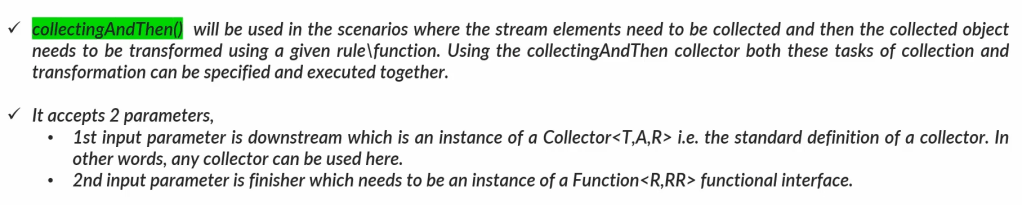
collectingAndThen() method in Stream API – Terminal operation
The collectingAndThen() method in the Java Stream API is a utility method provided by the Collectors class that allows you to first collect the elements of a stream using a collector and then apply a finishing transformation to the result. This method is useful when you want to perform a post-processing operation on the result of a collection.
Simple Explanation:
- Purpose: To collect elements into a container (like a
List,Set, orMap) and then apply a further transformation to the collected result. - How It Works: You provide a primary collector to gather the stream elements and a finishing function to process the result of that collection.
Example :
String joinedString = words.stream()
    .collect(Collectors.collectingAndThen(
                             Collectors.joining(", "),
                             result -> "Words: " + result
    ));

System.out.println(joinedString);
// Output: Words: apple, banana, cherry
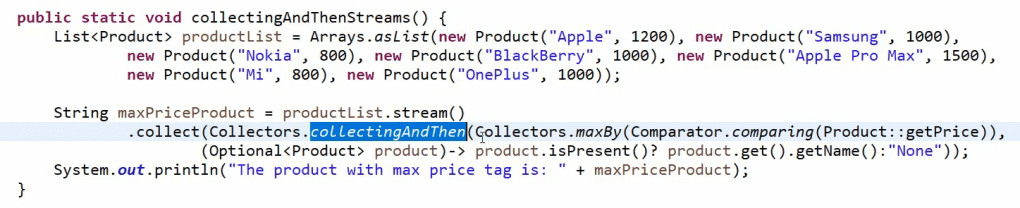
collectingAndThen() is a terminal operation that triggers the stream processing and applies the finishing transformation to the collected result.
Summary
collectingAndThen()allows you to collect elements using a primary collector and then apply a finishing transformation to the collected result.- It is useful for scenarios where you need to create immutable collections, apply additional transformations, or perform custom post-processing on the collection result.
- It enhances the capability of stream processing by combining collection and transformation steps in a single operation.
groupingBy() method in Stream API
Groups elements of the stream by a classifier function into a Map.
The groupingBy() method of Collectors class in Java is used for grouping objects by some property and storing results in a Map instance.
In order to use it, we always need to specify a property by which the grouping would be performed. This method provides similar functionality to SQL’s GROUP BY clause.
List<String> words = Arrays.asList("apple", "banana", "cherry");

Map<Integer, List<String>> groupedByLength = words.stream()
                  .collect(Collectors.groupingBy(String::length));

System.out.println(groupedByLength);
// Output: {5=[apple], 6=[banana, cherry]}
partitioningBy() method in Stream API
Partitions the elements of the stream into two groups based on a predicate.
Collectors partitioningBy() method is used to partition a stream of objects (or a set of elements) based on a given predicate. The fact that the partitioning function returns a boolean means the resulting grouping Map will have a Boolean as a key type, and therefore there can be atmost two different groups – one for true, and one for false.
List<String> words = Arrays.asList("apple", "banana", "cherry");

Map<Boolean, List<String>> partitioned = words.stream()
    .collect(Collectors.partitioningBy(w -> w.length() > 5));

System.out.println(partitioned);
// Output: {false=[apple], true=[banana, cherry]}
Compared to filters, Partitioning has the advantage of keeping both lists of the stream elements, for which the application of the partitioning function returns true or false.
Stream Pipeline
Chaining of stream operations to form a stream pipeline.
A stream pipeline in Java is a sequence of stream operations that process a stream of elements. The pipeline consists of a series of intermediate operations (which transform or filter the elements) followed by a terminal operation (which produces a result or a side effect).
–> We can form a chain of stream operations using intermediate and terminal operation to achieve a desired output. This we also call as stream pipeline.
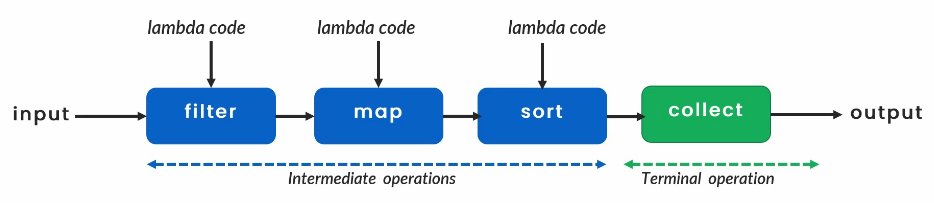
There is no limitation on max number of intermediate operations, whereas collect terminal operation has to be only one.
Stream Pipeline Structure
- Source: The starting point of the stream pipeline, usually a collection, array, or I/O channel.
- Intermediate Operations: Operations that transform or filter the stream. These are lazy and return a new stream.
- Terminal Operation: The final operation that triggers the processing of the stream and produces a result or side effect.
Example :
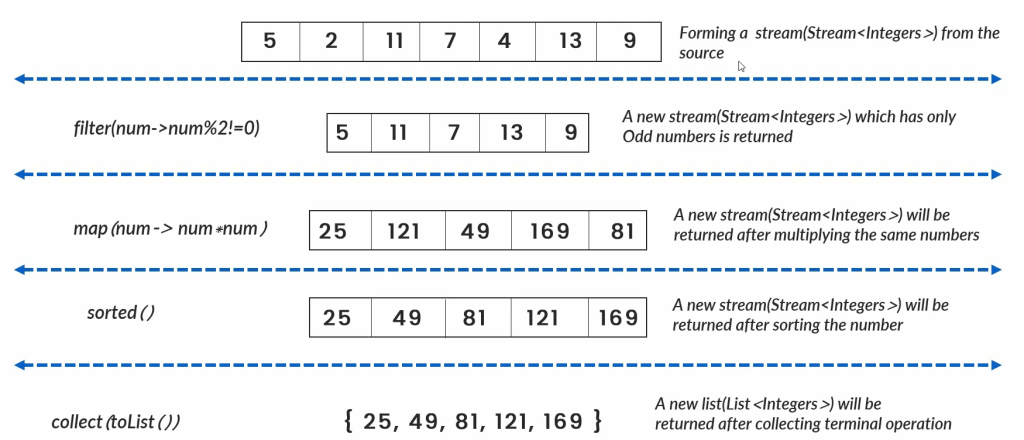
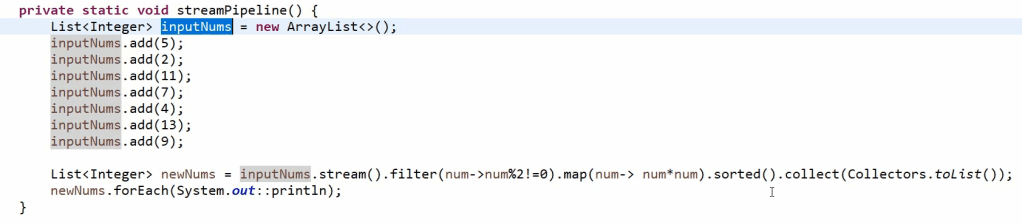
Common Examples of Stream Pipelines
Filtering and Mapping
Objective: Filter a list of numbers to keep only even numbers, then square them, and finally collect the results into a list.
List<Integer> numbers = Arrays.asList(1, 2, 3, 4, 5, 6, 7, 8, 9, 10);

List<Integer> result = numbers.stream()
    .filter(n -> n % 2 == 0)       // Keep only even numbers
    .map(n -> n * n)                // Square each number
    .collect(Collectors.toList());  // Collect the results into a list

System.out.println(result);
// Output: [4, 16, 36, 64, 100]
Grouping and Counting
Objective: Group a list of words by their length and count how many words there are of each length.
List<String> words = Arrays.asList("apple", "banana", "cherry", "date", "fig", "grape");

Map<Integer, Long> wordLengthCount = words.stream()
    .collect(Collectors.groupingBy(String::length, Collectors.counting()));

System.out.println(wordLengthCount);
// Output: {3=2, 4=1, 5=2, 6=1}
Sorting and Collecting
Objective: Sort a list of strings in alphabetical order and collect them into a single concatenated string.
List<String> words = Arrays.asList("apple", "banana", "cherry", "date");

String sortedWords = words.stream()
    .sorted()                      // Sort in natural order
    .collect(Collectors.joining(", ")); // Join into a single string

System.out.println(sortedWords);
// Output: apple, banana, cherry, date
Partitioning
Objective: Partition a list of numbers into two lists, one containing even numbers and the other containing odd numbers.
List<Integer> numbers = Arrays.asList(1, 2, 3, 4, 5, 6, 7, 8, 9, 10);

Map<Boolean, List<Integer>> partitioned = numbers.stream()
    .collect(Collectors.partitioningBy(n -> n % 2 == 0));

System.out.println(partitioned);
// Output: {false=[1, 3, 5, 7, 9], true=[2, 4, 6, 8, 10]}
Summary
- Source: Provides the initial stream of elements.
- Intermediate Operations: Transform or filter the stream (e.g.,
filter(),map(),sorted()). These operations are lazy and can be chained. - Terminal Operation: Triggers the processing of the stream and produces a final result or side effect (e.g.,
collect(),forEach(),reduce()).
Stream pipelines enable powerful and flexible data processing by combining these operations into expressive and efficient code.
Collections v/s Streams