What is JDBC ?
In this article, we’re going to take a look at JDBC (Java Database Connectivity) which is an API for connecting and executing queries on a database.
JDBC can work with any database as long as proper drivers are provided.
JDBC stands for Java Database Connectivity. It is a Java API (Application Programming Interface) that provides a standard way for Java programs to interact with databases. JDBC enables developers to connect to a database, execute SQL queries or statements, retrieve and manipulate data, and perform other database-related operations.
With JDBC, developers can perform tasks such as establishing a connection to a database, creating database statements, executing queries, retrieving and updating data, and handling transactions. It provides a standardized way to interact with different databases, allowing Java applications to be database-independent to some extent.
There are 4 components that make up JDBC :
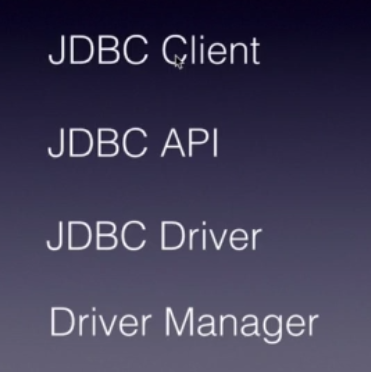
The JDBC Client – this is nothing but the code or application that we are developing where we consume JDBC API.
The JDBC API – is the standard API from Oracle, it consists of a set of classes and interfaces that define methods and properties for establishing connections to databases, executing SQL statements, and managing the results. It acts as a bridge between the Java programming language and various database management systems (DBMS) such as Oracle, MySQL, Microsoft SQL Server, PostgreSQL, and others.
JDBC Driver – this is a program which is an interface between our JDBC client application and underlying database. JDBC follows a driver-based architecture, where different database vendors provide their own JDBC drivers to connect to their specific databases. These drivers implement the JDBC API and handle the communication between the Java application and the underlying database.
DriverManager – this is a helper class which finds a driver and establishes a connection to the database.
Overall, JDBC plays a crucial role in Java database programming, providing a reliable and efficient means of integrating databases with Java applications.
JDBC API
This is part of java.sql.* package. It comprises of several interfaces and classes like, Connection, Statement, ResultSet, etc.
The key components of the JDBC API include:
- DriverManager: This class manages a list of database drivers. It provides methods for registering and deregistering drivers, establishing database connections, and creating statement objects.
- Connection: The Connection interface represents a connection to a specific database. It provides methods for executing SQL statements, managing transactions, retrieving metadata about the database, and controlling connection-related properties.
- Statement and PreparedStatement: These interfaces are used to execute SQL statements against the database.
- The Statement interface allows executing static SQL statements, while the
- PreparedStatement interface allows parameterized SQL statements, providing enhanced performance and security.
- ResultSet: The ResultSet interface represents the result of a database query. It provides methods for retrieving data from the result set, navigating through the rows, and accessing metadata about the columns.
- DatabaseMetaData: The DatabaseMetaData interface provides methods to obtain information about the database, such as the database name, driver name, supported features, and schema details. It helps in building more flexible and database-independent applications.
- CallableStatement: The CallableStatement interface is used to execute stored procedures or database functions. It allows the execution of parameterized SQL statements that are precompiled on the database server.
These are some of the primary components of the JDBC API. There are additional classes and interfaces within the JDBC API that support specific features like batch updates, handling SQL exceptions, managing transactions, and more.
JDBC drivers provided by specific database vendors implement these JDBC interfaces to enable connectivity and interaction with their respective databases.
JDBC Driver
A JDBC driver is a software component that allows Java applications to connect and interact with a specific database management system (DBMS). It acts as a bridge between the Java application and the database, providing the necessary functionality to establish connections, send queries, retrieve results, and manage database transactions.
JDBC drivers are responsible for handling the communication protocols and translating the JDBC API calls into a format that the underlying database can understand. They encapsulate the database-specific details and provide a standardized interface for Java applications to interact with different databases.
A JDBC driver is a JDBC API implementation used for connecting to a particular type of database.
There are four types of JDBC drivers:
- Type 1: JDBC-ODBC Bridge Driver:
- This type of driver uses the ODBC (Open Database Connectivity) API to connect to the database.
- It requires the ODBC driver to be installed on the system.
- It is platform-dependent and may not be suitable for all operating systems.
- Type 2: Native API Partly Java Driver:
- This type of driver uses a combination of Java and native code to communicate with the database.
- It calls the native libraries of the DBMS to establish the connection and perform database operations.
- It provides better performance than the Type 1 driver but is still platform-dependent.
- Type 3: Network Protocol Driver:
- This type of driver communicates with the database server through a middle-tier application server using a network protocol.
- The driver converts JDBC calls into a protocol that is understood by the middle-tier server, which then communicates with the database.
- It is platform-independent and can be used for different databases with the appropriate middleware.
- Type 4: Pure Java Driver: also called thin drivers
- This type of driver is implemented purely in Java and communicates directly with the database using the native protocol of the DBMS.
- It does not require any external libraries or middleware.
- It is platform-independent and provides the best performance and compatibility.
** NOTE – Each database vendor typically provides its own JDBC driver, which needs to be obtained and included in the Java application’s classpath. The JDBC driver implements the required interfaces defined by the JDBC API, allowing the Java application to connect to the specific database and perform various operations.
The most commonly used type is type 4, as it has the advantage of being platform-independent. Connecting directly to a database server provides better performance compared to other types. The downside of this type of driver is that it’s database-specific – given each database has its own specific protocol.
By using the appropriate JDBC driver, developers can write database-independent Java code that can seamlessly connect to and work with different databases without needing to modify the application’s source code.
JDBC Client
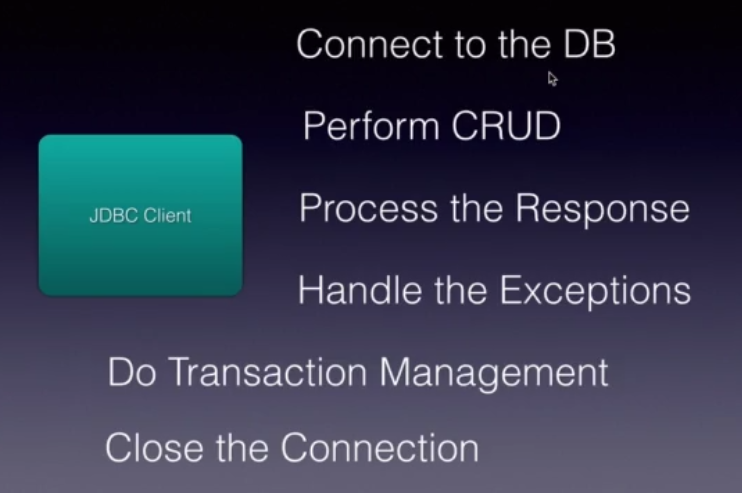
What all we try to do in our client application :
DriverManager
Our Java application uses the driver manager once and only once to find the appropriate driver to connect to the database and then it establishes a connection through the driver and returns the connection back to our Java client. From that point, our Java application will directly communicate with the driver to execute all the SQL operations.
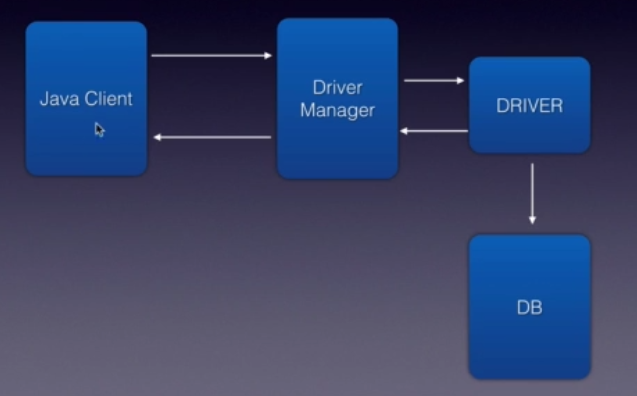
To connect to a database, we must get an instance of a JDBC driver.
We can obtain it through the DriverManager by specifying the JDBC URL connection string. Such a URL contains the type of database engine, database name, hostname, and port, as well as other connection parameters that are specific to the database vendor.
Using the connection string, we can obtain a database connection object, which is the foundational unit of communication with the database in JDBC.
- The
DriverManagerclass is responsible for managing a list of database drivers. It provides methods for registering and deregistering drivers, establishing database connections, and creating statement objects. TheDriverManagerclass automatically loads and registers JDBC drivers based on the JDBC URL provided.
Here’s an example of using DriverManager to establish a database connection:
String url = "jdbc:mysql://localhost:3306/mydatabase";
String username = "username";
String password = "password";
Connection connection = DriverManager.getConnection(url, username, password);


// another example

Connection con = DriverManager.getConnection(
   "jdbc:postgresql://localhost:21500/test?user=fred&password=secret&ssl=true");
How does the driver manager know which driver to use if the only indication is the specified URL?
There may be many JDBC drivers on the classpath, so there must be a way to distinguish each driver uniquely.
- Legacy Approach – Before JDBC version 4 and Java SE 1.6, there was no generic mechanism in the JVM that would enable services to be discovered and registered automatically. Because of that, a manual step was needed to load the JDBC driver class by name. The
Class.forNamemethod is used to dynamically load the JDBC driver class into the memory. It takes the fully qualified class name of the JDBC driver as a parameter and loads the corresponding class.
Here’s an example of using Class.forName to load a JDBC driver:
Class.forName("com.mysql.cj.jdbc.Driver");
** Note that in recent versions of JDBC (JDBC 4.0 and later), using Class.forName is not strictly necessary because the JDBC drivers can be automatically loaded and registered by the DriverManager when their JAR files are present on the classpath. However, in some older versions or specific scenarios, explicitly loading the driver using Class.forName may still be required.
To summarize, DriverManager is responsible for managing drivers and establishing connections, while Class.forName is used to explicitly load the JDBC driver class into memory.
In older versions of JDBC, before obtaining a connection, we first had to initialize the JDBC driver by calling the Class.forName method. As of JDBC 4.0, all drivers that are found in the classpath are automatically loaded. Therefore, we won’t need this Class.forName part in modern environments.

