Static keyword
In Java, the static keyword is used to declare a member (field or method) that belongs to the class rather than to an instance of the class. This means that the member is shared among all instances of the class, and there is only one copy of the static member for the entire class.

Here are the main uses and purposes of the static keyword in Java:
Static Fields: When you declare a field as static, it becomes a class-level variable, not an instance-level variable. All instances of the class share the same value for that field. It is commonly used for constants or variables that should have the same value across all objects of the class.
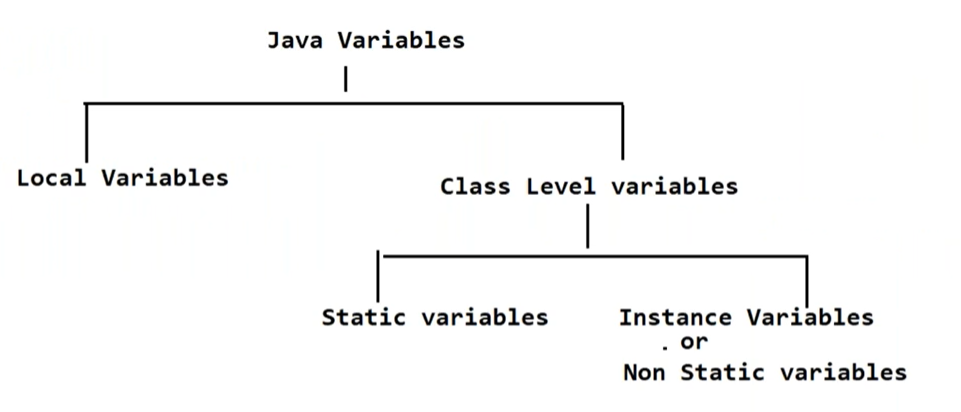
Important points :
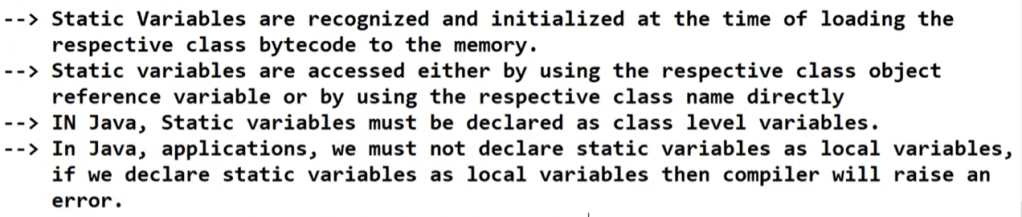
public class MyClass {
    public static int count; // Static field shared among all instances
    // ...
}
Static Methods: When you declare a method as static, it becomes a class-level method, not an instance-level method. You can call it directly on the class itself without creating an instance of the class. Static methods cannot access instance-specific data, but they can only access other static members.
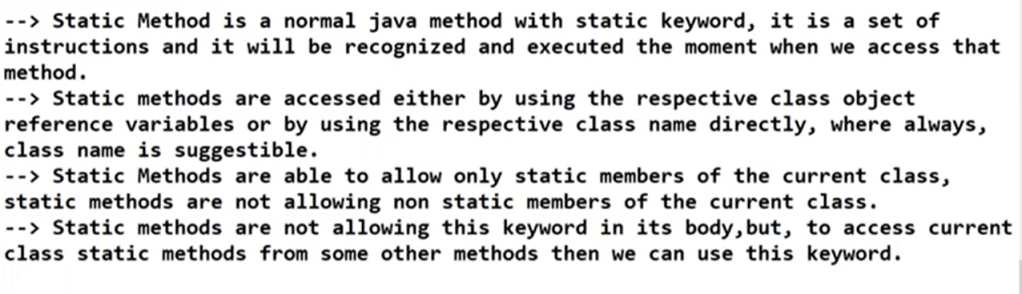
public class MathUtils {
    public static int add(int a, int b) {
        return a + b;
    }

    // Usage:
    int result = MathUtils.add(5, 3);
}
Static Blocks: You can use static blocks to initialize static fields or perform other one-time setup operations for the class. Static blocks are executed only once when the class is loaded.
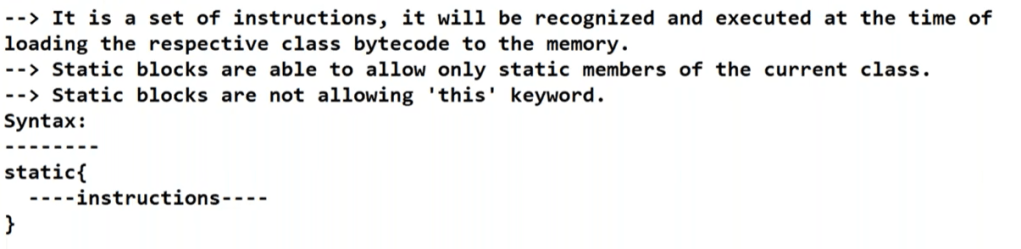
public class MyClass {
    public static int x;

    static {
        // Static block to initialize x
        x = 10;
    }
}
Static Nested Classes: Nested classes declared as static are associated with the outer class, but they do not require an instance of the outer class to be instantiated. They are essentially independent and behave like regular top-level classes.
public class OuterClass {
    static class StaticNestedClass {
        // ...
    }
}
It’s essential to use static members judiciously. Overuse of static can lead to tight coupling and make the code difficult to maintain and test. However, when used appropriately, static can be quite useful for utility classes, constants, and methods that don’t rely on instance-specific data.
Static import : In Java, the static import feature allows you to directly access static members (fields and methods) of a class without qualifying them with the class name. It was introduced in Java 5 (JDK 5) to simplify the access to frequently used static elements and improve code readability. The static import statement is particularly useful when you have to use static members from a specific class multiple times within a source file.
Here’s an example to illustrate how static import works:
// Suppose you have a class with static members like this:
package mypackage;

public class MathUtils {
    public static int add(int a, int b) {
        return a + b;
    }

    public static int multiply(int a, int b) {
        return a * b;
    }
}
Now, you can use static import to access these static members directly in your main code:
import static mypackage.MathUtils.*;

public class Main {
    public static void main(String[] args) {
        int sum = add(5, 3); // No need to use MathUtils.add
        int product = multiply(2, 4); // No need to use MathUtils.multiply
        System.out.println("Sum: " + sum);
        System.out.println("Product: " + product);
    }
}
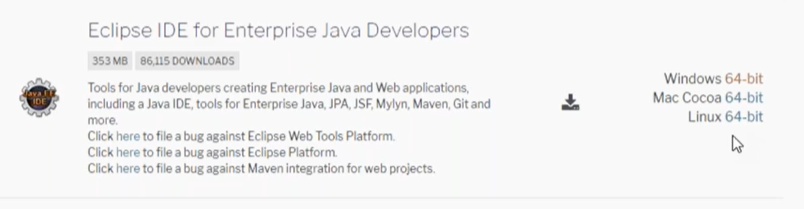
Eclipse IDE
Class.forName() method and newInstance() method
Consider below code :
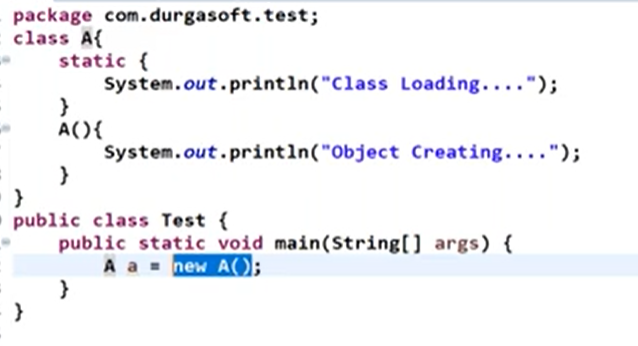
In the above code, when we create object, it will first perform class loading and then runs the constructor to create object.
Output :
Class Loading...
Object Creating...
If we want to perform only class loading without creating an object, then we need to use Class.forName() method.
The Class.forName() method specifically is used to dynamically load classes during runtime based on their fully qualified class name (including the package name).
** One of the most common use cases for Class.forName() is loading JDBC drivers for database connectivity. Since different databases require different JDBC drivers, using Class.forName() to load the appropriate driver class dynamically allows your application to be more flexible in connecting to different databases.
When class names need to be specified in configuration files, using Class.forName() lets you load those classes without hardcoding them into your source code. This promotes separation of concerns and easier maintenance of configuration details.
public static Class<?> forName(String className) throws ClassNotFoundException

Ex:
Class c = Class.forName("com.rndayala.basics.A");

String className = "com.example.MyClass"; // your fully qualified class name
try {
     Class<?> loadedClass = Class.forName(className);
     System.out.println("Class loaded: " + loadedClass.getName());
} catch (ClassNotFoundException e) {
     System.err.println("Class not found: " + className);
}
How JVM resolves the class name that we specified ?
- It will search for the class in the current location
- Inside Java Standard library
- Classpath location
How do we create object for a class that we dynamically loaded ?
The newInstance() method was a method provided by the java.lang.Class class in Java that allowed you to create a new instance of a class. However, starting from Java 9, the newInstance() method has been deprecated due to various reasons.
public T newInstance() throws InstantiationException, IllegalAccessException
The method attempts to create a new instance of the class using the public, default constructor. If the class doesn’t have a public no-argument constructor, or if the constructor throws an exception, this method will throw either an InstantiationException or an IllegalAccessException.
public class Main {
    public static void main(String[] args) {
        String className = "com.rndayala.basics.Hello"; // fully qualified class name

        try {
            // Load the class dynamically using Class.forName()
            Class<?> c = Class.forName(className);

            // Create a new instance of the loaded class using newInstance()
            Hello hello = (Hello) c.newInstance();

            // Call the sayHello() method on the instance
            hello.sayHello();
        } catch (ClassNotFoundException | InstantiationException | IllegalAccessException e) {
            e.printStackTrace();
        }
    }
}
Dynamic Input approaches in Java
If we provide input data to Java application at runtime, then that input data is called as dynamic input.
3 ways :
- Scanner
- Buffered Reader
- Console.
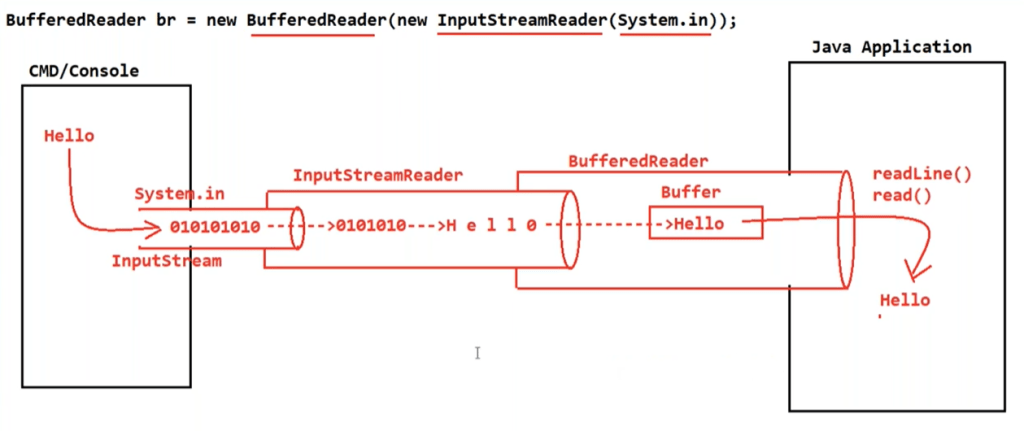
BufferedReader
Using BufferedReader is another common way to handle dynamic input in Java. It’s particularly useful when you want to read user input from the console with more flexibility and efficiency than using Scanner.
import java.io.BufferedReader;
import java.io.IOException;
import java.io.InputStreamReader;

public class BufferedReaderExample {
    public static void main(String[] args) {
        BufferedReader reader = new BufferedReader(new InputStreamReader(System.in));

        try {
            System.out.print("Enter your name: ");
            String name = reader.readLine();

            System.out.print("Enter your age: ");
            int age = Integer.parseInt(reader.readLine());

            System.out.println("Hello, " + name + "! You are " + age + " years old.");
        } catch (IOException | NumberFormatException e) {
            e.printStackTrace();
        } finally {
            try {
                reader.close(); // Remember to close the BufferedReader when done.
            } catch (IOException e) {
                e.printStackTrace();
            }
        }
    }
}
The readLine() method is used to read a line of text, and we handle possible exceptions that might occur during the input process. It reads characters from the stream until it encounters a newline ('\n') character or the end of the stream.
The read() method is used to read characters one at a time and doesn’t distinguish between lines of text. It reads a single character or byte from an input stream. Also, it returns an integer value representing the character read, or -1 if the end of the stream is reached.
This approach can be more efficient than Scanner for reading large amounts of input or for more complex input scenarios.
readline() v/s read() method
readLine() and read() are both methods provided by various classes in Java for reading input from streams, but they serve different purposes and have different characteristics:
readLine()Method:readLine()is a method available in classes likeBufferedReaderandLineNumberReaderthat reads a line of text from an input stream.- It reads characters from the stream until it encounters a newline (
'\n') character or the end of the stream. - The newline character itself is not included in the returned string.
- It returns
nullwhen the end of the stream is reached. readLine()is commonly used for reading text-based files, reading user input from the console, and other scenarios where you want to process input line by line.
BufferedReader reader = new BufferedReader(new FileReader("myfile.txt"));
String line;
while ((line = reader.readLine()) != null) {
    System.out.println(line);
}
reader.close();
read() Method :
read()is a method available in classes likeInputStream,Reader, and their subclasses. It reads a single character or byte from an input stream.- It returns an integer value representing the character read, or -1 if the end of the stream is reached.
- It reads characters one at a time and doesn’t distinguish between lines of text.
- If you are reading text, you need to cast the returned integer value to a
charor use aReaderfor character-based streams.
FileInputStream inputStream = new FileInputStream("myfile.txt");
int data;
while ((data = inputStream.read()) != -1) {
    char character = (char) data; // casting is required
    System.out.print(character);
}
inputStream.close();
In summary, readLine() is suitable for reading text line by line, while read() is more low-level and reads individual characters or bytes. The choice between them depends on the nature of the data you’re reading and how you want to process it.
Example :
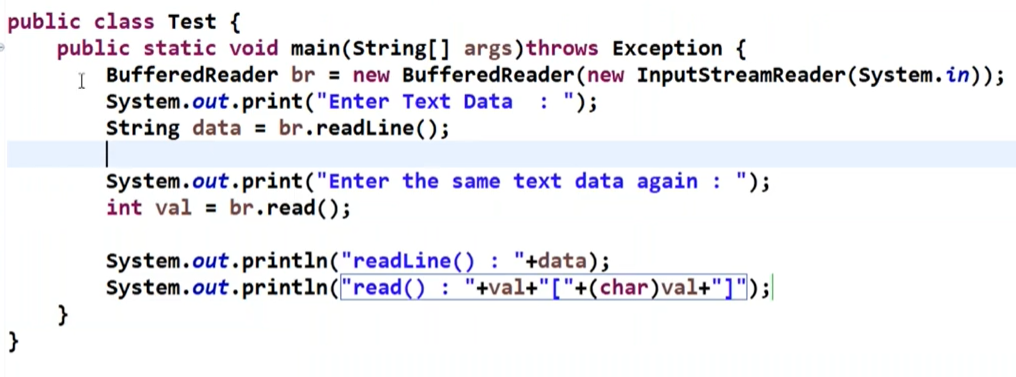
Output :

Scanner
BufferedReader is primarily designed for reading characters from an input stream, so it might not be the most straightforward choice when dealing with primitive types like integers, floats, and so on.
With BufferedReader, it is a 2 step process :

System.out.print("Enter an integer: ");
String input = reader.readLine();
int number = Integer.parseInt(input);
You read a line of input as a string using readLine(), and then you parse it using Integer.parseInt() to convert it into an integer.
However, if you’re dealing with a lot of primitive types, you might find using Scanner more convenient, as it provides methods for directly reading primitive types. For instance, you can use nextInt() to read an integer, nextDouble() to read a double, and so on.

The Scanner class in Java provides methods to read various types of data from an input source, including integers, characters, and floating-point numbers. Here’s how you can use the Scanner class to read these primitive types:
import java.util.Scanner;

public class ScannerExample {
    public static void main(String[] args) {
        Scanner scanner = new Scanner(System.in);

        // Reading an integer
        System.out.print("Enter an integer: ");
        int intValue = scanner.nextInt();
        System.out.println("You entered: " + intValue);

        // Reading a character
        System.out.print("Enter a character: ");
        char charValue = scanner.next().charAt(0); // Read the first character
        System.out.println("You entered: " + charValue);

        // Reading a float
        System.out.print("Enter a float: ");
        float floatValue = scanner.nextFloat();
        System.out.println("You entered: " + floatValue);

        scanner.close(); // Remember to close the Scanner when done.
    }
}
nextInt(): Reads an integer value from the input source.next().charAt(0): Reads a string and then extracts the first character. This is used for reading a single character. Note that you need to enter a single character followed by pressing the Enter key.nextFloat(): Reads a floating-point value (float) from the input source.- To read string data :
next() andnextLine()
Each of these methods waits for the user to input data and press the Enter key. After the input is provided, the program reads and processes it accordingly.
** Remember that user input can be unpredictable, and using Scanner methods without proper error handling can lead to exceptions. Make sure to handle exceptions that might arise due to unexpected input.
next() v/s nextLine() method
The next() and nextLine() methods in the Scanner class of Java are used to read strings from an input source. However, they behave differently in terms of how they handle whitespace and line breaks.
next()Method:- The
next()method reads the next complete token (a sequence of characters without whitespace) from the input source. - It skips leading whitespace and stops reading when it encounters whitespace (such as space or tab) or a line break.
- It returns the string that represents the token.
- The
Scanner scanner = new Scanner(System.in);

System.out.print("Enter your first name: ");
String firstName = scanner.next();

System.out.print("Enter your last name: ");
String lastName = scanner.next();

System.out.println("Full Name: " + firstName + " " + lastName);

scanner.close();
nextLine() Method:
- The
nextLine()method reads the entire line of text until it encounters a line break (newline character\n) or the end of the input source. - It returns the entire line, including spaces, tabs, and any other characters, up to the line break.
Scanner scanner = new Scanner(System.in);

System.out.print("Enter your address: ");
String address = scanner.nextLine();

System.out.println("Address: " + address);

scanner.close();
In summary, if you’re using next() to read input, be aware that it stops at the first whitespace it encounters. If you want to read a full line of text, including spaces, use nextLine(). The choice between them depends on the nature of your input and the behavior you need for your program.

