Object in Scala
object HelloWorld {
  def main(args: Array[String]): Unit = {
    println("Hello,World! Welcome to Scala!!")
  }
}
In Scala, object is a keyword used to define a singleton object. A singleton object is an instance of a class that is created only once, meaning there can be only one instance of it in the program. This concept is used in Scala to encapsulate utility methods, constants, or as a replacement for static members (since Scala doesn’t have static methods like Java).
- Object is automatically instantiated. No need to use
newkeyword to instantiate. - ** We do not have a
statickeyword in Scala. - Everything inside
objectis by defaultstatic. - In
object, all the methods are by defaultstatic.
Key Features of object in Scala:
- Singleton: An
objectis created once and used globally in the program. It cannot be instantiated multiple times.- No
newKeyword: You don’t need to (and cannot) use thenewkeyword to create an instance of anobject.
- No
- No Constructor: Since an
objectis a singleton, it does not have a constructor like a class. - Static-Like Behavior: In Java, static methods and variables are associated with a class rather than an instance. Scala doesn’t have the
statickeyword, so you use anobjectto define methods or fields that should be globally accessible without requiring an instance of a class. - Companion Object: When an
objecthas the same name as a class and is defined in the same file, it is called a companion object. It can access the private members of the class and vice versa. Theobjectprovides methods and functionality that relate to the class but do not require an instance of the class. - Application Entry Point: In Scala, the entry point of a program is defined within an
objectusing themainmethod. Thismainmethod is executed when the program starts.
Differences Between object and class:
| Aspect | object | class |
|---|---|---|
| Instantiation | Only one instance (singleton). | Can have multiple instances. |
| Constructor | No constructor. | Can define constructors. |
| Usage | Used for static-like functionality, utilities, or entry points. | Defines a blueprint for creating objects. |
| Creation | Automatically instantiated. | Needs to be instantiated using new. |
Utility Methods: We can use object as like Java static utility classes.
object MathUtils {
  def add(a: Int, b: Int): Int = a + b
}
println(MathUtils.add(2, 3))  // Output: 5
In short, an object in Scala is a singleton that is useful for defining methods, constants, and as an entry point for Scala applications. It helps achieve a static-like structure without requiring the static keyword like in Java.
object Notes :
// Program 2: Singleton object
object DemoObjectB { //1st Note: Instead of class, this is object
  val x = 2
  val y = 5.5

  def addValue() =  x + y

  println(s"x = ${x} , y = ${y}")
}

object SingletonDemoA {
  def main(args: Array[String]): Unit = {

//    val demoObjectB1 = new DemoObjectB //2nd Note: If you uncomment it, it will give error, as we can not create object from a object
    println(DemoObjectB.x, DemoObjectB.y) //3rd Note: Access variable as objectName.variableName

    val a = DemoObjectB.addValue() //4th Note: Access method/function as objectName.method
    println(a)
  }
}
What are functions in Scala ?
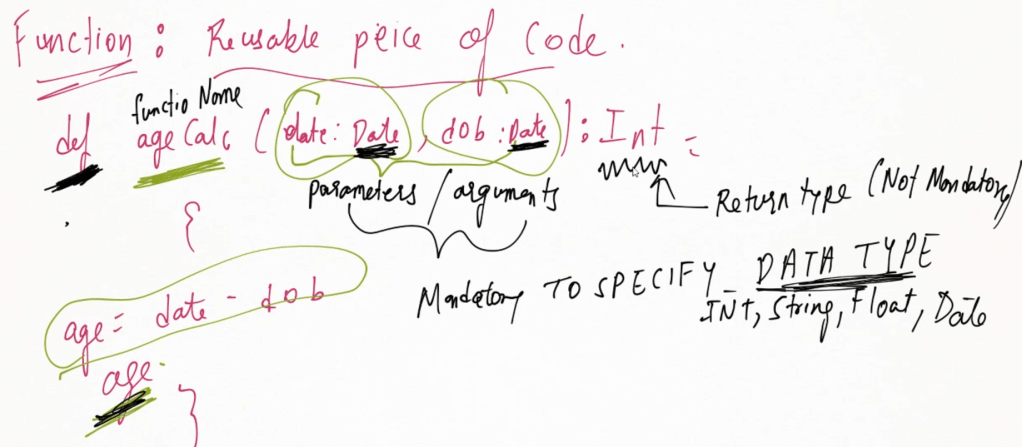
Functions are reusable piece of code.
In Scala, functions are first-class citizens, which means they can be passed as arguments, returned from other functions, and assigned to variables. Functions in Scala can be defined as both named or anonymous (lambda) functions, and they can exist outside the context of a class or object, making them versatile and powerful.
Defining Functions (Methods)
A named function in Scala is defined using the def keyword, followed by the function name, parameters, return type (optional), and the function body.
def functionName(param1: Type1, param2: Type2): ReturnType = {
  // Function body
  // Return value
}
Ex:
def add(a: Int, b: Int): Int = {
  a + b
}

println(add(5, 3))  // Output: 8
addis a function that takes two integers and returns their sum.Intis the return type.- The function body is
a + b, which calculates the sum.
In Scala, the return keyword is optional when returning values from functions. In most cases, you do not need to use the return keyword explicitly. The value of the last expression in the function body is automatically returned.
  def addA(a: Int, b: Int): Int = {
    a + b    // Not mandatory to specify the return keyword
  }
When return is Not Required
If a function consists of a single expression or multiple expressions, the last evaluated expression in the function body is considered the return value.
In the example above, a + b is the last expression, so it is automatically returned from the function.
In most cases, you should avoid using return in Scala. However, if you are working with control flow that requires an early exit from the function (such as complex loops or conditions), you might use return. But even then, Scala has other control structures, such as try, match, and others, to handle such cases more idiomatically.
- Using the
returnkeyword is optional but generally discouraged in Scala. - Avoid using
returnunless absolutely necessary, as it breaks from Scala’s functional style.
Scala can often infer the return type of a function based on the expression inside the function body, so specifying the return type is optional unless recursion is involved.
  def addB(a: Int, b: Int) = { // Not mandatory to specify return type. It is auto interpreted
    a + b    // Not mandatory to specify the return keyword
  }
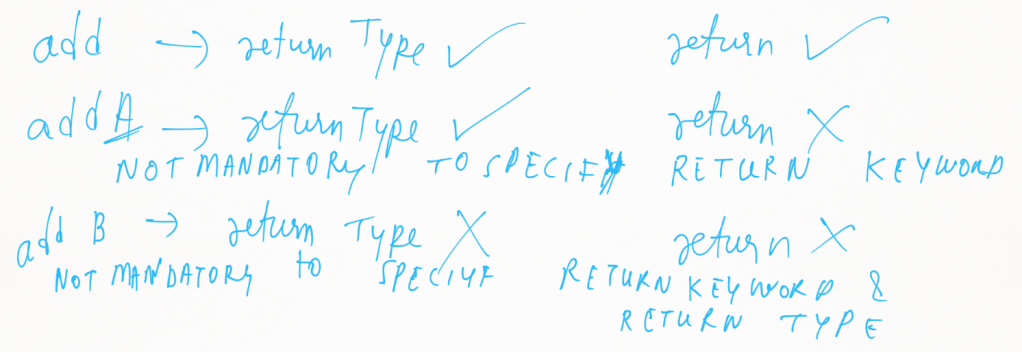
- Return type is Optional.
def multiply(a: Int, b: Int) = {
    a * b
}

println(multiply(4, 2))  // Output: 8
Default Parameters / Default arguments
You can define default values for parameters in Scala functions, which will be used if no argument is passed for that parameter.
def greet(name: String = "World"): String = s"Hello, $name!"

println(greet())        // Output: Hello, World!
println(greet("Scala")) // Output: Hello, Scala!
Nested Functions
Scala allows you to define functions inside other functions. These are called nested functions.
def outerFunction(a: Int, b: Int): Int = {
  def innerFunction(x: Int, y: Int): Int = x + y
  innerFunction(a, b)
}

println(outerFunction(5, 3))  // Output: 8
In this example, innerFunction is nested inside outerFunction and can only be accessed within outerFunction.
Anonymous Functions (Lambdas)
Anonymous functions are functions without a name. They are often used when passing functions as arguments or when the function is short and concise.
(parameter1: Type1, parameter2: Type2) => expression
Ex:
val add = (a: Int, b: Int) => a + b

println(add(5, 3))  // Output: 8
addis an anonymous function that takes two parameters (aandb) and returns their sum.- The
=>separates the parameters from the function body.
Higher-Order Functions
A higher-order function is a function that takes other functions as arguments or returns a function. This allows for greater flexibility and reusability of code.
def applyFunction(f: (Int, Int) => Int, x: Int, y: Int): Int = f(x, y)

val add = (a: Int, b: Int) => a + b
val multiply = (a: Int, b: Int) => a * b

println(applyFunction(add, 5, 3))       // Output: 8
println(applyFunction(multiply, 5, 3))  // Output: 15
Explanation :
def applyFunction(f: (Int, Int) => Int, x: Int, y: Int): Int = f(x, y)
applyFunction is a higher-order function. It takes three parameters:
f: A function of type(Int, Int) => Int, which means it is a function that takes twoIntarguments and returns anInt.xandy: Two integers (Int).
Inside the function, f(x, y) is called, which means it applies the passed function f to the arguments x and y. The result of f(x, y) is returned as the result of the applyFunction.
val add = (a: Int, b: Int) => a + b
val multiply = (a: Int, b: Int) => a * b
These are anonymous functions (lambdas).
add: This function takes two parameters,aandb, and returns their sum (a + b).multiply: This function takes two parameters,aandb, and returns their product (a * b).
println(applyFunction(add, 5, 3))       // Output: 8
println(applyFunction(multiply, 5, 3))  // Output: 15
applyFunction(add, 5, 3):
- The
addfunction is passed as the first argument (f) toapplyFunction. applyFunctionthen applies theaddfunction to the integers5and3, so the result is5 + 3 = 8.printlnprints8to the console.
applyFunction(multiply, 5, 3):
- The
multiplyfunction is passed as the first argument (f) toapplyFunction. applyFunctionthen applies themultiplyfunction to the integers5and3, so the result is5 * 3 = 15.printlnprints15to the console.
Key Concepts
- Higher-Order Function:
applyFunctionis a higher-order function because it takes another function (f) as a parameter. - Anonymous Functions (Lambdas):
addandmultiplyare anonymous functions (or lambdas), which are passed as arguments toapplyFunction. - Function Application: Inside
applyFunction,f(x, y)calls the function passed asf, applying it toxandy.
Functions as Values
In Scala, functions are first-class values, meaning you can assign them to variables, pass them around as parameters, and return them from other functions.
val add = (a: Int, b: Int) => a + b
val result = add(2, 3)

println(result)  // Output: 5
Here, add is a variable that holds a function.
Partially Applied Functions
You can create a function by fixing some of its parameters, which creates a partially applied function.
A partially applied function is a function where you fix some of its parameters, leaving the rest to be provided later. This technique can simplify repetitive function calls where some arguments are constant.
def multiply(a: Int, b: Int) = a * b
val multiplyBy2 = multiply(2, _: Int)

println(multiplyBy2(5))  // Output: 10
Explanation:
Defining the Function multiply:
def multiply(a: Int, b: Int) = a * b
multiply is a regular function that takes two parameters:
a: An integer (Int).b: Another integer (Int).
The function body multiplies a and b (a * b) and returns the result.
multiply(2, 5) // Returns 10
This function will return the product of 2 and 5, which is 10.
Creating a Partially Applied Function multiplyBy2:
val multiplyBy2 = multiply(2, _: Int)
- Here,
multiplyBy2is a partially applied function. - We are “fixing” the first parameter
aof themultiplyfunction to2, while leaving the second parameterbunspecified. - The underscore (
_) acts as a placeholder for the second argument, which will be provided later.
In essence, multiplyBy2 is a new function that takes only one parameter, b, and multiplies it by 2. It is equivalent to:
val multiplyBy2 = (b: Int) => multiply(2, b)
Calling the Partially Applied Function multiplyBy2:
println(multiplyBy2(5)) // Output: 10
- When you call
multiplyBy2(5), it internally callsmultiply(2, 5), because the first parameter (2) was fixed when we createdmultiplyBy2. - The result of
multiply(2, 5)is10, soprintlnprints10to the console.
Key Concepts
- Partially Applied Function:
- We created a new function (
multiplyBy2) by fixing one parameter of themultiplyfunction. - The placeholder (
_) indicates that the second argument will be provided later when the partially applied function is called.
- We created a new function (
- Function Simplification:
multiplyBy2is a simpler version of themultiplyfunction, where the first argument is always2. This can be useful in cases where one parameter is always constant.

