Comments
Scala supports several types of comments, similar to many other programming languages. Here’s a rundown of the different ways to add comments in Scala:
Single-Line Comments
Single-line comments start with two forward slashes (//). Everything after the // on that line is considered a comment and is ignored by the compiler.
Syntax:
// This is a single-line comment
val x = 10  // This is also a single-line comment
Multi-Line Comments
Multi-line comments are enclosed between /* and */. This type of comment can span multiple lines.
Syntax:
/*
  This is a multi-line comment.
  It can span multiple lines.
*/
val y = 20
Documentation Comments
Scala does not have a specific syntax for documentation comments like Java’s /** ... */. However, you can use multi-line comments to create documentation-like comments.
Example:
/**
  * This is a documentation comment.
  * It is used to provide information about the class or method.
  */
class MyClass {
  /**
    * This method adds two numbers.
    * @param a The first number.
    * @param b The second number.
    * @return The sum of the two numbers.
    */
  def add(a: Int, b: Int): Int = a + b
}
Inline Comments
You can place comments inline with code to explain or annotate specific parts of a line of code. These comments start with // and are often used for brief explanations.
Example:
val sum = add(5, 7) // Adding 5 and 7
Block Comments
Although not a distinct type of comment, block comments in Scala are the same as multi-line comments and can be used to comment out large sections of code.
Example:
/*
  This block comment can be used to comment out
  multiple lines of code temporarily.
  val x = 10
  val y = 20
*/
Summary:
- Single-line comments: Use
//for brief comments on a single line. - Multi-line comments: Use
/* ... */for comments spanning multiple lines. - Documentation comments: Use
/** ... */for creating documentation-like comments, although it’s less formalized in Scala compared to languages like Java.
These comment types help you document and annotate your code for better readability and maintenance.
Keywords
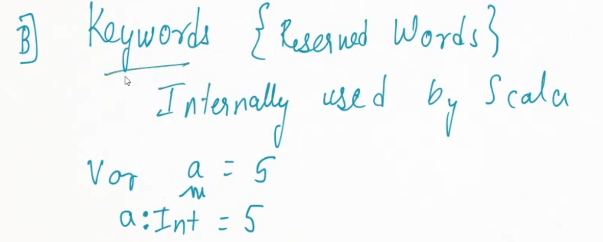
Scala has a set of reserved keywords that have special meaning in the language and cannot be used as variable names or identifiers.
| abstract | case | catch | class |
| def | do | else | extends |
| false | final | finally | for |
| forSome | if | implicit | import |
| lazy | match | new | Null |
| object | override | package | private |
| protected | return | sealed | super |
| this | throw | trait | Try |
| true | type | val | Var |
| while | with | yield | |
| – | : | = | => |
| <- | <: | <% | >: |
| # | @ |
Here’s a list of the important Scala keywords, organized into categories based on their functionality:
1. Declaration and Definition Keywords:
class: Defines a class.trait: Defines a trait (similar to an interface with default implementations).object: Defines a singleton object (like a static class in other languages).def: Defines a method.val: Defines an immutable variable (similar to a constant).var: Defines a mutable variable.type: Defines a new type alias.package: Defines a package.import: Imports a package or class.
2. Control Flow Keywords:
if: Conditional branching.else: Alternative branch of anifstatement.for: Looping and comprehensions.while: Looping construct.do: Used indo-whileloops.return: Returns from a method.match: Pattern matching construct, similar to a switch statement.case: Defines cases within pattern matching.try: Defines a block of code that might throw exceptions.catch: Handles exceptions thrown in atryblock.finally: Defines a block that is always executed aftertryandcatch.throw: Throws an exception.yield: Produces a value in aforcomprehension.
3. Modifiers:
private: Access modifier that restricts visibility to the current class or object.protected: Restricts visibility to the class and its subclasses.abstract: Declares a class or member to be abstract.final: Prevents a class from being subclassed or a method from being overridden.sealed: Restricts subclassing to the current file.override: Overrides a method or field in a subclass.implicit: Marks a definition as eligible for implicit conversions or parameters.lazy: Delays initialization of a value until it is accessed for the first time.
4. Object-Oriented Programming Keywords:
extends: Defines inheritance from a class or trait.with: Mixes in traits.new: Instantiates a new object.super: Refers to a superclass (used to call a superclass method or constructor).this: Refers to the current instance of a class or object.
5. Functional Programming Keywords:
=>: Defines function literals (anonymous functions).<-: Used inforcomprehensions to iterate over collections.:_*: Expands a sequence to varargs in method calls.implicit: Marks a value as implicit, enabling implicit conversion or parameters.
6. Literals and Type Keywords:
null: Represents a null reference.trueandfalse: Boolean literals.type: Used to define a new type alias.Unit: Equivalent tovoidin other languages, representing no value.Nothing: Represents the bottom type, which is a subtype of every other type.Any: The supertype of all types.AnyVal: The supertype of all value types (likeInt,Double).AnyRef: The supertype of all reference types (likeString,List).
7. Concurrency and Parallelism:
synchronized: Marks a block of code as synchronized.@volatile: Ensures visibility of changes to a variable across threads.
8. Other Keywords:
asInstanceOf: Casts an object to a specific type.isInstanceOf: Checks if an object is of a specific type.import: Imports members from a package or object.match: Used for pattern matching.case: Used in pattern matching or defining case classes.lazy: For lazy initialization of values.object: Defines singleton objects.package: Defines a package.
9. Soft Keywords:
Some keywords in Scala are contextual or soft keywords, meaning they only act as keywords in certain contexts and can be used as identifiers otherwise.
macro: Used for defining macros.inline: Marks methods for inline expansion.enum: Defines enumerations (from Scala 3 onwards).
Example:
class MyClass extends BaseClass with TraitExample {
  def myMethod(): Unit = {
    val x = 10
    if (x > 5) {
      println("x is greater than 5")
    } else {
      println("x is 5 or less")
    }
  }
}
These keywords form the backbone of Scala syntax, enabling you to define classes, functions, and manage flow control in the language.
println() statement in Scala
The println statement in Scala is used to print output to the console. It automatically adds a newline at the end of the output, which is similar to System.out.println in Java.
println(expression)
Where expression is the value or variable you want to print. You can also print multiple expressions by concatenating them or using string interpolation.
1. Printing Simple Values:
println("Hello, Scala!")    // Prints: Hello, Scala!
println(42)                 // Prints: 42
println(3.14)               // Prints: 3.14]
2. Printing Variables:
val name = "Alice"
val age = 25
println(name)   // Prints: Alice
println(age)    // Prints: 25
3. Concatenating Strings:
You can concatenate multiple values using the + operator.
val name = "Bob"
val greeting = "Hello, " + name + "!"
println(greeting)  // Prints: Hello, Bob!
4. Using String Interpolation:
Scala provides a convenient way to embed variables or expressions in strings using string interpolation with the s prefix.
val name = "Charlie"
val age = 30
println(s"Hello, $name! You are $age years old.")  // Prints: Hello, Charlie! You are 30 years old.
5. Printing the Result of an Expression:
You can also print the result of a complex expression.
println(5 + 10)          // Prints: 15
println(100 / 5)         // Prints: 20
println(s"Sum: ${10 + 20}")  // Prints: Sum: 30
s"..." (String Interpolation):
- The
sbefore the string indicates that Scala should treat this string as a “string interpolator”. - This allows variables and expressions to be embedded inside the string, and their values will be evaluated and inserted at runtime.
${...} (Expression inside curly braces):
- The
${}is used to embed expressions or variables inside the string. - Here, the expression inside the curly braces is
10 + 20. Scala will evaluate this expression, which results in30, and then replace${10 + 20}with30in the string.
6. Multi-Line Output:
You can use multiple println statements to print content across multiple lines.
println("This is line 1")
println("This is line 2")
println("This is line 3")
7. Printing Lists and Collections:
You can directly print lists, arrays, or other collections.
val nums = List(1, 2, 3, 4, 5)
println(nums)  // Prints: List(1, 2, 3, 4, 5)

val arr = Array(10, 20, 30)
println(arr.mkString(", "))  // Prints: 10, 20, 30
Summary:
printlnis used for printing values to the console with a newline.- Supports printing of variables, expressions, and collections.
- Use string interpolation (
s"...") for easily embedding variables in strings.
This is the primary way to output results and debug information in Scala.
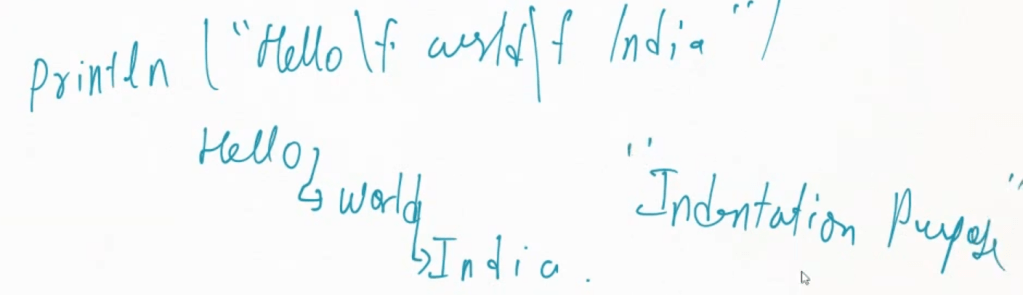
\f is for form feed.