What and Why ArrayList
ArrayList is most commonly used data structure from Collections framework.
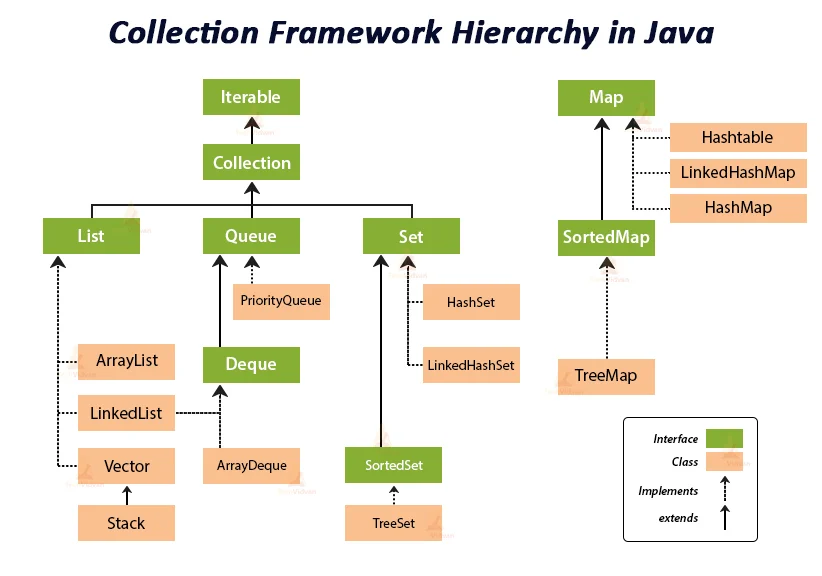
ArrayList is an implementation of the List interface in the Java Collections Framework. It provides a resizable array-based implementation of a dynamic list, allowing you to store and manipulate elements in a flexible and efficient manner.
ArrayList allows storing duplicates and also null values. It’s important to note that ArrayList treats each occurrence of a duplicate or null value as a separate entry.
Here are some key features and reasons why you might choose to use ArrayList:
- Dynamic Size:
ArrayListautomatically adjusts its size as elements are added or removed, making it convenient for situations where the number of elements may vary over time. You do not need to worry about manually managing the underlying array’s size. - Random Access:
ArrayListallows for constant-time random access to elements based on their index. This means you can quickly retrieve elements from the list using theget(int index)method. - Fast Iteration:
ArrayListprovides efficient iteration over its elements using enhanced for loops or theIteratorinterface. It is particularly useful when you need to iterate through the entire list or access elements sequentially. - Dynamic Modification:
ArrayListsupports various methods for adding, removing, and modifying elements. You can easily append elements to the end of the list (add(E element)), insert elements at specific positions (add(int index, E element)), remove elements (remove(int index)orremove(Object o)), and modify existing elements (set(int index, E element)). - Backed by an Array: Internally,
ArrayListis backed by an array, which provides efficient element storage and retrieval. This array-based implementation offers faster random access compared to linked data structures. - Compatibility with Algorithms:
ArrayListis widely used and supported in Java libraries and APIs. It is compatible with various algorithms, utility classes, and methods provided by the Java Collections Framework, making it easy to integrate with existing code. - Simple and Familiar API:
ArrayListhas a straightforward and intuitive API, allowing for easy adoption and usage. It inherits methods from theListinterface, providing a consistent interface for working with other list implementations.
However, it’s important to note that ArrayList might not be the best choice in every situation. If you frequently insert or remove elements in the middle of the list, LinkedList may offer better performance. Additionally, if thread safety is a concern, you might consider using Vector or other concurrent collection classes.
In summary, ArrayList is a commonly used implementation of the List interface, providing dynamic size, random access, fast iteration, and efficient element manipulation. It is a versatile choice for many scenarios where you need to work with ordered collections of elements.
** If appending elements to the list (or) removing the last element is a frequent operation, then you can use ArrayList as both these operations can be performed in constant time O(1) time. NOTE : While appending element, if the ArrayList internal capacity is reached, it would trigger resizing and additional time involved.
ArrayList class syntax in Java API
The syntax of the ArrayList class in the Java API is as follows:
public class ArrayList<E> extends AbstractList<E>
        implements List<E>, RandomAccess, Cloneable, Serializable {

    // Constructors
    public ArrayList();
    public ArrayList(int initialCapacity);
    public ArrayList(Collection<? extends E> c);

    // Methods
    public boolean add(E e);
    public void add(int index, E element);
    public boolean addAll(Collection<? extends E> c);
    public boolean addAll(int index, Collection<? extends E> c);
    public void clear();
    public boolean contains(Object o);
    public E get(int index);
    public int indexOf(Object o);
    public boolean isEmpty();
    public int lastIndexOf(Object o);
    public E remove(int index);
    public boolean remove(Object o);
    public boolean removeAll(Collection<?> c);
    public boolean retainAll(Collection<?> c);
    public E set(int index, E element);
    public int size();
    public List<E> subList(int fromIndex, int toIndex);
    public Object[] toArray();
    public <T> T[] toArray(T[] a);
    public void trimToSize();
}
In the above syntax, the ArrayList class is defined as a generic class (ArrayList<E>) that can work with elements of any specific type represented by the type parameter E.
The class extends the AbstractList class and implements the List interface, RandomAccess interface (indicating fast random access), Cloneable interface (supporting cloning), and Serializable interface (supporting serialization).
ArrayList – Capacity
Since an array is used internally to implement this data structure, it obviously has some size associated with it and by default it is set to 10. The capacity of an ArrayList refers to the size of this internally array.
The ArrayList class in Java dynamically resizes itself to accommodate the elements added to it. It internally maintains an array that holds the elements. The capacity of an ArrayList refers to the size of this internal array, which may be larger than the number of elements currently stored in the list.
Here are a few key points about the capacity of an ArrayList:
- Initial Capacity: When you create an
ArrayListusing the default constructor (ArrayList()), it starts with an initial capacity of 10. This means the internal array can hold up to 10 elements without needing to resize. - Resizing: If you add more elements to an
ArrayListand its internal array reaches its capacity, theArrayListautomatically increases the capacity by creating a new, larger array and copying the elements from the old array to the new one. This resizing process typically doubles the size of the internal array (or) in some cases, it increased by 50%. - Capacity vs. Size: The capacity of an
ArrayListis not the same as its size. The size refers to the number of elements currently stored in the list, while the capacity refers to the total number of elements theArrayListcan hold before it needs to resize its internal array. - Controlling Capacity: If you know the expected number of elements in advance, you can specify the initial capacity when creating the
ArrayListusing the constructorArrayList(int initialCapacity). This can help avoid unnecessary resizing operations if you have an estimate of the number of elements you will be adding. - TrimToSize: If you want to minimize the internal array’s size to match the current number of elements, you can use the
trimToSize()method. This method reduces the capacity of theArrayListto be the same as its size, potentially saving memory if you no longer expect to add many more elements.
In summary, the capacity of an ArrayList refers to the total number of elements it can hold before needing to resize its internal array. The ArrayList class manages the capacity dynamically, automatically resizing as needed to accommodate additional elements.
** When the capacity is reached, a new array is created with a size that is 50% or double than the old array size. Old array contents are copied into the new array. However, excessive resizing due to adding large numbers of elements can impact performance, so it’s beneficial to estimate the expected size when possible.
ensureCapacity(int) method
The ensureCapacity(int) method is a method in the ArrayList class that allows you to ensure that the ArrayList has a minimum capacity specified by the parameter. It increases the capacity of the internal array, if necessary, to accommodate at least the specified number of elements without automatic resizing.
public void ensureCapacity(int minCapacity)
Here’s how the ensureCapacity(int) method works:
- If the current capacity of the
ArrayListis less than theminCapacityparameter, theensureCapacity(int)method increases the capacity of the internal array to be at leastminCapacity. This ensures that theArrayListcan accommodate the specified number of elements without resizing. - If the current capacity is already greater than or equal to the
minCapacity, no resizing occurs. TheensureCapacity(int)method has no effect in this case.
Using ensureCapacity(int) can be helpful when you have an estimate of the number of elements to be added to the ArrayList. It allows you to allocate sufficient capacity in advance, reducing the number of resizing operations and improving performance.
// Ensure that the ArrayList has a minimum capacity of 20
myList.ensureCapacity(20);
trimToSize() method example
Here is the example :
import java.util.ArrayList;

public class ArrayListExample {
    public static void main(String[] args) {

        // Create an ArrayList with an initial capacity of 20
        ArrayList<String> myList = new ArrayList<>(20);

        // Add elements to the ArrayList
        myList.add("Apple");
        myList.add("Banana");
        myList.add("Orange");

        // Print the elements and size of the ArrayList before trimming
        System.out.println("Elements in the ArrayList: " + myList);
        System.out.println("Size of the ArrayList before trimming: " + myList.size());

        // Trim the ArrayList to match its size
        myList.trimToSize();

        // Print the elements and size of the ArrayList after trimming
        System.out.println("Elements in the ArrayList after trimming: " + myList);
        System.out.println("Size of the ArrayList after trimming: " + myList.size());
    }
}
In this example, we create an ArrayList called myList with an initial capacity of 20 using the ArrayList(int initialCapacity) constructor. We add elements to the myList using the add() method.
We use the trimToSize() method to trim the ArrayList to match its size, reducing the internal array’s capacity to match the number of elements.
The trimToSize() method is useful when you want to minimize the memory footprint of the ArrayList by reducing its internal array’s capacity to match the actual number of elements. This can be beneficial if you no longer expect to add many more elements to the list and want to save memory.
Note that calling trimToSize() does not affect the functionality of the ArrayList. If you subsequently add more elements, the ArrayList will automatically resize its internal array to accommodate the additional elements, as needed.
ArrayList – duplicate and null values
It’s important to note that ArrayList treats each occurrence of a duplicate or null value as a separate entry.
Duplicate Values: ArrayList permits storing duplicate values. You can add multiple occurrences of the same element to the list, and they will be stored as separate entries.
Null Values: ArrayList allows storing null values. You can add null as an element to the list without any issues.
ArrayList<String> myList = new ArrayList<>();
myList.add("Apple");
myList.add(null);
myList.add("Banana");
myList.add(null);
myList.add("Apple");

System.out.println(myList.contains(null));       // Output: true
System.out.println(myList.indexOf(null));        // Output: 1
System.out.println(myList.lastIndexOf(null));    // Output: 3

System.out.println(myList);  // Output: [Apple, null, Banana, null, Apple]
ArrayList methods
add(index, element) method
The ArrayList class in Java provides the add(int index, E element) method, which allows you to insert an element at a specific position in the list. Here’s how the add(int index, E element) method works:
public void add(int index, E element)
- The
indexparameter represents the position at which you want to insert theelement. It should be within the range of0tosize()(inclusive). - The
elementparameter represents the element to be inserted at the specified index.
When you call add(int index, E element), the method inserts the specified element at the specified index in the ArrayList. The existing elements from the index onwards are shifted to the right (their indices are incremented by 1).
        // Insert an element at index 1
        myList.add(1, "Mango");
It’s important to note that the add(int index, E element) method should be used with caution, as it can potentially affect the performance for large lists. Shifting elements requires additional processing time, especially when inserting at the beginning or middle of the list.
remove(index) method
The ArrayList class in Java provides the remove(int index) method, which allows you to remove an element at a specific position in the list. Here’s how the remove(int index) method works:
public E remove(int index)
- The
indexparameter represents the position of the element to be removed. It should be within the range of0tosize() - 1(inclusive).
When you call remove(int index), the method removes the element at the specified index from the ArrayList. The elements to the right of the removed element are shifted to the left (their indices are decremented by 1).
** The method returns the element that was removed from the list.
        // Remove the element at index 1
        String removedElement = myList.remove(1);
It’s important to note that when you remove an element using remove(int index), the indices of the subsequent elements change. Therefore, if you plan to iterate over the list using indices, be cautious when removing elements to avoid skipping or accessing the wrong elements.
boolean contains(Object o)
The contains(Object o) method is a convenient way to check for the presence of an element in an ArrayList without explicitly iterating over the list. It provides a simple and efficient way to perform membership checks.
The contains(Object o) method in the ArrayList class is used to check whether the list contains a specific element. It returns a boolean value indicating whether the specified object is present in the list or not. Here’s how the contains(Object o) method works:
public boolean contains(Object o)
- The
oparameter represents the object that you want to check for presence in the list.
When you call contains(Object o), the method checks if the specified object is present in the ArrayList. It iterates over the elements in the list and uses the equals() method to compare the specified object with each element. If a matching element is found, the method returns true. If the specified object is not found in the list or if the list is empty, the method returns false.
        // Create an ArrayList
        ArrayList<String> myList = new ArrayList<>();

        // Add elements to the ArrayList
        myList.add("Apple");
        myList.add("Banana");
        myList.add("Orange");

        // Check if "Banana" is present in the ArrayList
        boolean containsBanana = myList.contains("Banana");
        System.out.println("ArrayList contains 'Banana': " + containsBanana);
 // true
We then use the contains("Banana") method to check if the ArrayList contains the element “Banana”. The method returns true because “Banana” is present in the list.
contains(Object o) relation with equals() method
The contains(Object o) method in the ArrayList class uses the equals() method to determine whether the specified object is present in the list.
When contains(Object o) is called, it iterates over the elements in the ArrayList and calls the equals() method on each element to compare it with the specified object o. By using equals(), the method can perform customized equality checks if the element class overrides the equals() method.
By default, the equals() method in the Object class compares the references of objects, which means two different instances with the same content are considered unequal. However, many classes in Java, including String, Integer, and custom classes, override the equals() method to provide meaningful equality comparisons based on their internal state.
Therefore, when using contains(Object o) with an ArrayList, it’s important to consider how the equals() method is defined for the objects you are working with.
** If you’re working with custom classes, you may need to override the equals() method to ensure proper equality comparisons according to your specific requirements.
By relying on the equals() method, contains(Object o) provides flexibility to handle various types of objects and supports customized equality comparisons, making it suitable for general use cases.
NOTE – The methods contains(), indexOf(), lastIndexOf() – all these methods use equals() method to compare the object with each of the element in the list.
boolean removeAll(Collection<?> c) method
The removeAll(Collection<?> c) method in the ArrayList class is used to remove all elements from the list that are contained in the specified collection.
Here’s how the removeAll(Collection<?> c) method works internally:
- Iteration: The
removeAll(Collection<?> c)method iterates over each element in the specified collection (c). - Element Comparison: For each element in the specified collection, the
removeAllmethod internally calls theremove(Object o)method to remove all occurrences of that element from theArrayList. It uses theequals()method to determine the equality between the elements. - Removal: When
remove(Object o)is called, it iterates over the elements in theArrayListand removes all occurrences of the specified objecto. This is achieved by shifting the subsequent elements to the left and updating the size of theArrayListaccordingly. - Iteration Completion: After iterating through all the elements in the specified collection, the
removeAllmethod completes the removal process.
The removeAll(Collection<?> c) method returns true if at least one element was removed from the ArrayList. If no elements were removed, it returns false.
Here’s an example that demonstrates the usage of the removeAll(Collection<?> c) method:
import java.util.ArrayList;
import java.util.Arrays;
import java.util.List;

public class ArrayListExample {
    public static void main(String[] args) {
        // Create an ArrayList
        ArrayList<String> myList = new ArrayList<>(Arrays.asList("Apple", "Banana", "Orange", "Apple"));

        System.out.println("ArrayList before removeAll: " + myList);

        // Create a collection with elements to remove
        List<String> toRemove = Arrays.asList("Apple", "Orange");

        // Remove elements from the ArrayList
        boolean removed = myList.removeAll(toRemove);

        System.out.println("Elements removed: " + removed);
        System.out.println("ArrayList after removeAll: " + myList);
    }
}
Output :
ArrayList before removeAll: [Apple, Banana, Orange, Apple]
Elements removed: true
ArrayList after removeAll: [Banana]
We use the removeAll(toRemove) method to remove all occurrences of the elements in the toRemove collection from the ArrayList. In this case, “Apple” and “Orange” are removed.
Internally, the removeAll(Collection<?> c) method iterates over the elements in the specified collection, calls contains() method and if element is present, removes the matching element from the ArrayList, using the remove(Object o) method. It repeats this process for each element in the collection until all occurrences are removed.
ArrayList example
Here’s an example that demonstrates the usage of various methods in the ArrayList class :
import java.util.ArrayList;

public class ArrayListExample {
    public static void main(String[] args) {
        // Create an ArrayList
        ArrayList<String> myList = new ArrayList<>();

        // Add elements to the ArrayList
        myList.add("Apple");
        myList.add("Banana");
        myList.add("Orange");

        // Accessing elements using get() method
        System.out.println("Element at index 0: " + myList.get(0));
        System.out.println("Element at index 1: " + myList.get(1));
        System.out.println("Element at index 2: " + myList.get(2));

        // Modifying elements using set() method
        myList.set(1, "Grapes");

        // Printing the modified ArrayList
        System.out.println("Modified ArrayList: " + myList);

        // Checking the size of the ArrayList
        System.out.println("Size of ArrayList: " + myList.size());

        // Checking if the ArrayList is empty
        System.out.println("Is ArrayList empty? " + myList.isEmpty());
    }
}
Output :
Element at index 0: Apple
Element at index 1: Banana
Element at index 2: Orange
Modified ArrayList: [Apple, Grapes, Orange]
Size of ArrayList: 3
Is ArrayList empty? false
In the above example:
- We create an
ArrayListcalledmyList. - We use the
add()method to add three elements (“Apple”, “Banana”, and “Orange”) to theArrayList. - We use the
get()method to access and print the elements at specific indices (0, 1, and 2). - We use the
set()method to modify the element at index 1, replacing “Banana” with “Grapes”. - We print the modified
ArrayListusingSystem.out.println(). - We use the
size()method to check the size of theArrayListand print it. - We use the
isEmpty()method to check if theArrayListis empty (contains no elements) and print the result.
Another example :
import java.util.ArrayList;

public class ArrayListExample {
    public static void main(String[] args) {
        // Create an ArrayList
        ArrayList<String> myList = new ArrayList<>();

        // Add elements to the ArrayList
        myList.add("Apple");
        myList.add("Banana");
        myList.add("Orange");

        // Accessing elements using get() method
        System.out.println("Element at index 0: " + myList.get(0));
        System.out.println("Element at index 1: " + myList.get(1));
        System.out.println("Element at index 2: " + myList.get(2));

        // Modifying elements using set() method
        myList.set(1, "Grapes");

        // Printing the modified ArrayList
        System.out.println("Modified ArrayList: " + myList);

        // Checking the size of the ArrayList
        System.out.println("Size of ArrayList: " + myList.size());

        // Checking if the ArrayList is empty
        System.out.println("Is ArrayList empty? " + myList.isEmpty());

        // Removing elements using remove() method
        myList.remove("Apple");

        // Printing the ArrayList after removing an element
        System.out.println("ArrayList after removing an element: " + myList);

        // Removing all elements using removeAll() method
        myList.removeAll(myList);

        // Printing the ArrayList after removing all elements
        System.out.println("ArrayList after removing all elements: " + myList);

        // Adding elements to the ArrayList again
        myList.add("Mango");
        myList.add("Pineapple");

        // Iterating over elements using an enhanced for loop
        System.out.println("Iterating over elements:");
        for (String element : myList) {
            System.out.println(element);
        }
    }
}
Output :
Element at index 0: Apple
Element at index 1: Banana
Element at index 2: Orange
Modified ArrayList: [Apple, Grapes, Orange]
Size of ArrayList: 3
Is ArrayList empty? false
ArrayList after removing an element: [Grapes, Orange]
ArrayList after removing all elements: []
Iterating over elements:
Mango
Pineapple
In the above example:
- We create an
ArrayListcalledmyList. - We use the
add()method to add three elements (“Apple”, “Banana”, and “Orange”) to theArrayList. - We use the
get()method to access and print the elements at specific indices (0, 1, and 2). - We use the
set()method to modify the element at index 1, replacing “Banana” with “Grapes”. - We print the modified
ArrayListusingSystem.out.println(). - We use the
size()method to check the size of theArrayListand print it. - We use the
isEmpty()method to check if theArrayListis empty (contains no elements) and print the result. - We use the
remove()method to remove the element “Apple” from theArrayList. - We print the
ArrayListafter removing an element. - We use the
removeAll()method to remove all elements from theArrayList. - We print the
ArrayListafter removing all elements. - We add elements “Mango” and “Pineapple” to the
ArrayListagain. - We use an enhanced for loop to iterate over the elements in the
ArrayListand print each element.
 Bits, Bytes and Brains