What is an Abstract Factory Design Pattern
It’s more like factory of factories.
An abstract factory is a factory that returns factories. Why is this layer of abstraction useful? A normal factory can be used to create sets of related objects. An abstract factory returns factories. Thus, an abstract factory is used to return factories that can be used to create sets of related objects.
Abstract Factory is a creational design pattern, which solves the problem of creating entire product families without specifying their concrete classes.
** Abstract Factory defines an interface for creating all distinct products but leaves the actual product creation to concrete factory classes. Each factory type corresponds to a certain product variety.
In Abstract Factory pattern, we get rid of if-else block and have a concrete factory class for each sub-class and then an Abstract Factory class that will return the sub-class based on the input factory class.
The client code calls the creation methods of a factory object instead of creating products directly with a constructor call (new operator). Since a factory corresponds to a single product variant, all its products will be compatible.
Explanation – Understanding the pattern
This example illustrates how the Abstract Factory pattern can be used for creating cross-platform UI elements without coupling the client code to concrete UI classes, while keeping all created elements consistent with a selected operating system.
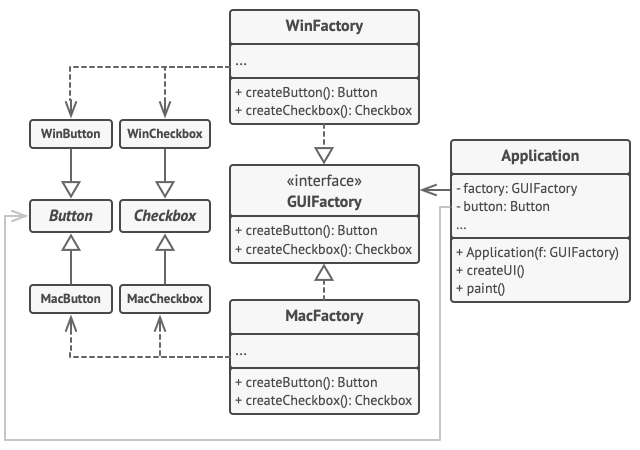
Ref – https://refactoring.guru/design-patterns/abstract-factory
The same UI elements in a cross-platform application are expected to behave similarly, but look a little bit different under different operating systems. Moreover, it’s your job to make sure that the UI elements match the style of the current operating system. You wouldn’t want your program to render macOS controls when it’s executed in Windows.
It works like this: when an application launches, it checks the type of the current operating system. The app uses this information to create a factory object from a class that matches the operating system. The rest of the code uses this factory to create UI elements. This prevents the wrong elements from being created.
The Abstract Factory interface declares a set of creation methods that the client code can use to produce different types of UI elements. Concrete factories correspond to specific operating systems and create the UI elements that match that particular OS.
Benefits
- Abstract Factory pattern provides approach to code for interface rather than
implementation. - Abstract Factory pattern is “factory of factories” and can be easily extended to
accommodate more products, for example we can easily add Material theme product family. - Abstract Factory pattern is robust and avoid conditional logic of Factory pattern.
When to use: A family of related product objects is designed to be used together, and you need to enforce this constraint.
Examples
Usage examples: The Abstract Factory pattern is pretty common in Java code. Many frameworks and libraries use it to provide a way to extend and customize their standard components.
Here are some examples from core Java libraries:
javax.xml.parsers.DocumentBuilderFactory#newInstance()javax.xml.transform.TransformerFactory#newInstance()javax.xml.xpath.XPathFactory#newInstance()
Identification: The pattern is easy to recognize by methods, which return a factory object. Then, the factory is used for creating specific sub-components.
Implementation
In our example, we create families of cross-platform GUI components and their production. The components, buttons and checkboxes will act as products. They have two variants: macOS and Windows.
The abstract factory defines an interface for creating buttons and checkboxes. There are two concrete factories, which return both products in a single variant.
Client code works with factories and products using abstract interfaces. It makes the same client code working with many product variants, depending on the type of factory object.
buttons: First product hierarchy
Button.java
package com.rndayala.designpatterns.abstractfactory;

/**
 * Abstract Factory assumes that you have several families of products,
 * structured into separate class hierarchies (Button/Checkbox). All products of
 * the same family have the common interface.
 *
 * This is the common interface for buttons family.
 */
public interface Button {
    void render();
}
MacOSButton.java
package com.rndayala.designpatterns.abstractfactory;

/**
 * All products families have the same varieties (MacOS/Windows).
 *
 * This is a MacOS variant of a button.
 */
public class MacOSButton implements Button {

    @Override
    public void render() {
        System.out.println("You have created MacOSButton.");
    }
}
WindowsButton.java
package com.rndayala.designpatterns.abstractfactory;

/**
 * All products families have the same varieties (MacOS/Windows).
 *
 * This is another variant of a button.
 */
public class WindowsButton implements Button {

    @Override
    public void render() {
        System.out.println("You have created WindowsButton.");
    }
}
checkboxes: Second product hierarchy
Checkbox.java
package com.rndayala.designpatterns.abstractfactory;

/**
 * Checkboxes is the second product family. It has the same variants as buttons.
 */
public interface Checkbox {
    void render();
}
MacOSCheckbox.java
package com.rndayala.designpatterns.abstractfactory;

/**
 * All products families have the same varieties (MacOS/Windows).
 *
 * This is a variant of a checkbox.
 */
public class MacOSCheckbox implements Checkbox {

    @Override
    public void render() {
        System.out.println("You have created MacOSCheckbox.");
    }
}
WindowsCheckbox.java
package com.rndayala.designpatterns.abstractfactory;

/**
 * All products families have the same varieties (MacOS/Windows).
 *
 * This is another variant of a checkbox.
 */
public class WindowsCheckbox implements Checkbox {

    @Override
    public void render() {
        System.out.println("You have created WindowsCheckbox.");
    }
}
Abstract factory : GUIFactory.java
package com.rndayala.designpatterns.abstractfactory;

/**
 * Abstract factory knows about all (abstract) product types.
 * It declares a set of creation methods for product types.
 */
public interface GUIFactory {
    Button createButton();
    Checkbox createCheckbox();
}
MacOSFactory.java: Concrete factory (macOS)
package com.rndayala.designpatterns.abstractfactory;

/**
 * Each concrete factory extends basic factory and responsible for creating
 * products of a single variety.
 */
public class MacOSFactory implements GUIFactory {

    @Override
    public Button createButton() {
        return new MacOSButton();
    }

    @Override
    public Checkbox createCheckbox() {
        return new MacOSCheckbox();
    }
}
WindowsFactory.java: Concrete factory (Windows)
package com.rndayala.designpatterns.abstractfactory;

/**
 * Each concrete factory extends basic factory and responsible for creating
 * products of a single variety.
 */
public class WindowsFactory implements GUIFactory {

    @Override
    public Button createButton() {
        return new WindowsButton();
    }

    @Override
    public Checkbox createCheckbox() {
        return new WindowsCheckbox();
    }
}
Client code : Application.java
package com.rndayala.designpatterns.abstractfactory;

/**
 * Factory users don't care which concrete factory they use since they work with
 * factories and products through abstract interfaces.
 */
public class Application {
    private Button button;
    private Checkbox checkbox;

    public Application(GUIFactory factory) {
        button = factory.createButton();
        checkbox = factory.createCheckbox();
    }

    public void render() {
        button.render();
        checkbox.render();
    }
}
App configuration : Demo.java
package com.rndayala.designpatterns.abstractfactory;

/**
 * Demo class. Everything comes together here.
 */
public class Demo {

    /**
     * Application picks the factory type and creates it in run time (usually at
     * initialization stage), depending on the configuration or environment
     * variables.
     */
    private static Application configureApplication() {
        Application app;
        GUIFactory factory;
        String osName = System.getProperty("os.name").toLowerCase();
        if (osName.contains("mac")) {
            factory = new MacOSFactory();
        } else {
            factory = new WindowsFactory();
        }
        app = new Application(factory);
        return app;
    }

    public static void main(String[] args) {
        Application app = configureApplication();
        app.render();
    }
}
Ref : https://refactoring.guru/design-patterns/abstract-factory
Use cases
- Use the Abstract Factory when your code needs to work with various families of related products, but you don’t want it to depend on the concrete classes of those products—they might be unknown beforehand or you simply want to allow for future extensibility.
- The Abstract Factory provides you with an interface for creating objects from each class of the product family. As long as your code creates objects via this interface, you don’t have to worry about creating the wrong variant of a product which doesn’t match the products already created by your app.

