What is a Builder Design Pattern
Builder is a creational design pattern that lets you construct complex objects step by step. The pattern allows you to produce different types and representations of an object using the same construction code.
It decouples the construction process from the object representation, allowing for the step-by-step creation of objects with different configurations.
The need ?
Imagine a complex object that requires laborious, step-by-step initialization of many fields and nested objects. Such initialization code is usually buried inside a monstrous constructor with lots of parameters. Or even worse: scattered all over the client cod
In general, the details of object construction – the constructors, such as instantiating and initializing the components that make up the object, are kept within the object, often as part of its constructor. This type of design closely ties the object construction process with the components that make up the object. This approach is suitable as long as the object under construction is simple and the object construction process is definite and always produces the same representation of the object.
However, this design may not be effective when the object being created is complex and the series of steps constituting the object creation process can be implemented in different ways, thus producing different representations of the object.
If we try to keep all such instantiation steps within the object, the object can become bulky (construction bloat) and less modular. Subsequently, adding a new implementation or making changes to an existing implementation requires changes to the existing code.
The Idea / Intent
The Builder pattern suggests that you extract the object construction code out of its own class and move it to separate objects called builders.
The Builder pattern suggests moving the construction logic out of the object class to a separate class referred to as a builder class. There can be more than one such builder classes, each with different implementations for the series of steps to construct the object. Each builder implementation results in a different representation of the object.
The intent of the Builder Pattern is to separate the construction of a complex object
from its representation, so that the same construction process can create different
representations.
This type of separation reduces the object size.
Adding a new implementation (i.e., adding a new builder) becomes easier. The object construction process becomes independent of the components that make up the object. This provides more control over the object construction process.
Explanation
Builder doesn’t require products to have a common interface. That makes it possible to produce different products using the same construction process.
Builder pattern allows you to create different configurations of an object step by step, providing a more flexible and readable way to construct objects with many optional parameters.
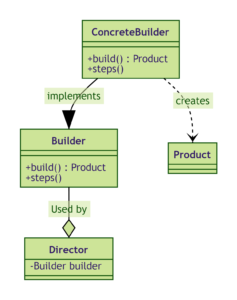
The main components of the Builder Design Pattern are:
- Director (optional) : The Director is responsible for directing the construction of the complex object using the Builder. It controls the order and sequence of the steps required to build the object using the Builder. It is not always necessary to have a Director.
- Builder Interface / Abstract class : The Builder is an interface or an abstract class that declares the construction steps and methods for creating a complex object. It typically includes methods for setting various attributes and returning the final product.
- Concrete Builder: Concrete Builders are implementations of the Builder interface that provide specific implementation details for constructing different parts of the complex object. Each Concrete Builder is responsible for building a particular variant of the object. It also, Provides an interface for retrieving the product.
- Product: The Product is the complex object being constructed. It typically contains multiple attributes and configurations. It is the final object resulting from the Builder’s construction process.
The Builder pattern suggests using a dedicated object referred to as a Director, which is responsible for invoking different builder methods required for the construction of the final object.
–> Once the object is constructed, the client object can directly request from the builder the fully constructed object. To facilitate this process, a new method getObject() can be declared in the common Builder interface to be implemented by different concrete builders.
Ref – https://refactoring.guru/design-patterns/builder
Benefits
The Builder pattern can be applied when construction of various representations of the product involves similar steps that differ only in the details.
The same construction process can create different representations.
Examples
Usage examples: The Builder pattern is a well-known pattern in Java world. It’s especially useful when you need to create an object with lots of possible configuration options.
Builder is widely used in Java core libraries:
java.lang.StringBuilder#append()(unsynchronized)java.lang.StringBuffer#append()(synchronized)java.nio.ByteBuffer#put()(also inCharBuffer,ShortBuffer,IntBuffer,LongBuffer,FloatBufferandDoubleBuffer)javax.swing.GroupLayout.Group#addComponent()- All implementations
java.lang.Appendable
Identification: The Builder pattern can be recognized in a class, which has a single creation method and several methods to configure the resulting object. Builder methods often support chaining (for example, someBuilder.setValueA(1).setValueB(2).create()).
Implementation
CarType
package com.rndayala.designpatterns.builder;

// Enum that sepcifies the type of Car
public enum CarType {
    CITY_CAR, SPORTS_CAR, SUV
}
Product feature 1 : Engine
package com.rndayala.designpatterns.builder;

/**
 * Just another feature of a Car product.
 */
public class Engine {
    private final double volume;
    private double mileage;
    private boolean started;

    public Engine(double volume, double mileage) {
        this.volume = volume;
        this.mileage = mileage;
    }

    public void on() {
        started = true;
    }

    public void off() {
        started = false;
    }

    public boolean isStarted() {
        return started;
    }

    public void go(double mileage) {
        if (started) {
            this.mileage += mileage;
        } else {
            System.err.println("Cannot go(), you must start engine first!");
        }
    }

    public double getVolume() {
        return volume;
    }

    public double getMileage() {
        return mileage;
    }
}
Product feature 2 : Transmission
/**
 * Just another feature Car product that specifies the type of Transmission.
 */
public enum Transmission {
    SINGLE_SPEED, MANUAL, AUTOMATIC, SEMI_AUTOMATIC
}
Product feature 3 : TripComputer
package com.rndayala.designpatterns.builder;

/**
 * Just another feature of Car product.
 */
public class TripComputer {

    private Car car;

    public void setCar(Car car) {
        this.car = car;
    }

    public void showFuelLevel() {
        System.out.println("Fuel level: " + car.getFuel());
    }

    public void showStatus() {
        if (this.car.getEngine().isStarted()) {
            System.out.println("Car is started");
        } else {
            System.out.println("Car isn't started");
        }
    }
}
Product feature 4 : GPSNavigator
package com.rndayala.designpatterns.builder;

/**
 * Just another feature of a car.
 */
public class GPSNavigator {
    private String route;

    public GPSNavigator() {
        this.route = "221b, Baker Street, London  to Scotland Yard, 8-10 Broadway, London";
    }

    public GPSNavigator(String manualRoute) {
        this.route = manualRoute;
    }

    public String getRoute() {
        return route;
    }
}
Concrete Product : Car
package com.rndayala.designpatterns.builder;

/**
 * Car is a product class.
 * Product is made up of different components which vary in details for different Product class types.
 */
public class Car {
    private final CarType carType;
    private final int seats;
    private final Engine engine;
    private final Transmission transmission;
    private final TripComputer tripComputer;
    private final GPSNavigator gpsNavigator;
    private double fuel = 0;

    public Car(CarType carType, int seats, Engine engine, Transmission transmission,
               TripComputer tripComputer, GPSNavigator gpsNavigator) {
        this.carType = carType;
        this.seats = seats;
        this.engine = engine;
        this.transmission = transmission;
        this.tripComputer = tripComputer;
        if (this.tripComputer != null) {
            this.tripComputer.setCar(this);
        }
        this.gpsNavigator = gpsNavigator;
    }

    public CarType getCarType() {
        return carType;
    }

    public double getFuel() {
        return fuel;
    }

    public void setFuel(double fuel) {
        this.fuel = fuel;
    }

    public int getSeats() {
        return seats;
    }

    public Engine getEngine() {
        return engine;
    }

    public Transmission getTransmission() {
        return transmission;
    }

    public TripComputer getTripComputer() {
        return tripComputer;
    }

    public GPSNavigator getGpsNavigator() {
        return gpsNavigator;
    }
}
Concrete Product : Manual
package com.rndayala.designpatterns.builder;

/**
 * Car manual is another product. Note that it does not have the same ancestor
 * as a Car. They are not related.
 *
 * Builder doesn’t require products to have a common interface.
 * That makes it possible to produce different products using the same construction process.
 */
public class Manual {
    private final CarType carType;
    private final int seats;
    private final Engine engine;
    private final Transmission transmission;
    private final TripComputer tripComputer;
    private final GPSNavigator gpsNavigator;

    public Manual(CarType carType, int seats, Engine engine, Transmission transmission,
                  TripComputer tripComputer, GPSNavigator gpsNavigator) {
        this.carType = carType;
        this.seats = seats;
        this.engine = engine;
        this.transmission = transmission;
        this.tripComputer = tripComputer;
        this.gpsNavigator = gpsNavigator;
    }

    public String print() {
        String info = "";
        info += "Type of car: " + carType + "\n";
        info += "Count of seats: " + seats + "\n";
        info += "Engine: volume - " + engine.getVolume() + "; mileage - " + engine.getMileage() + "\n";
        info += "Transmission: " + transmission + "\n";
        if (this.tripComputer != null) {
            info += "Trip Computer: Functional" + "\n";
        } else {
            info += "Trip Computer: N/A" + "\n";
        }
        if (this.gpsNavigator != null) {
            info += "GPS Navigator: Functional" + "\n";
        } else {
            info += "GPS Navigator: N/A" + "\n";
        }
        return info;
    }
}
Builder Interface
package com.rndayala.designpatterns.builder;

/**
 * Builder interface defines all possible ways to configure a product.
 * The interface declares all the methods to construct the complex object.
 */
public interface Builder {
    void setCarType(CarType type);
    void setSeats(int seats);
    void setEngine(Engine engine);
    void setTransmission(Transmission transmission);
    void setTripComputer(TripComputer tripComputer);
    void setGPSNavigator(GPSNavigator gpsNavigator);
}
Concrete Builder class : CarBuilder
package com.rndayala.designpatterns.builder;

/**
 * Concrete builders implements all steps defined in the common interface.
 * It provides specific implementations for constructing different parts of the complex object.
 */
public class CarBuilder implements Builder {
    private CarType type;
    private int seats;
    private Engine engine;
    private Transmission transmission;
    private TripComputer tripComputer;
    private GPSNavigator gpsNavigator;

    public void setCarType(CarType type) {
        this.type = type;
    }

    @Override
    public void setSeats(int seats) {
        this.seats = seats;
    }

    @Override
    public void setEngine(Engine engine) {
        this.engine = engine;
    }

    @Override
    public void setTransmission(Transmission transmission) {
        this.transmission = transmission;
    }

    @Override
    public void setTripComputer(TripComputer tripComputer) {
        this.tripComputer = tripComputer;
    }

    @Override
    public void setGPSNavigator(GPSNavigator gpsNavigator) {
        this.gpsNavigator = gpsNavigator;
    }

    // Concrete Builder - provides a method for retrieving the final product.
    public Car getResult() {
        return new Car(type, seats, engine, transmission, tripComputer, gpsNavigator);
    }
}
Concrete Builder class : CarManualBuilder
package com.rndayala.designpatterns.builder;

/**
 * Unlike other Creational patterns, Builder can construct unrelated products,
 * which don't have the common interface.
 *
 * In this case we build a user manual for a car, using the same steps as we
 * built a car. This allows to produce manuals for specific car models,
 * configured with different features.
 */
public class CarManualBuilder implements Builder{
    private CarType type;
    private int seats;
    private Engine engine;
    private Transmission transmission;
    private TripComputer tripComputer;
    private GPSNavigator gpsNavigator;

    @Override
    public void setCarType(CarType type) {
        this.type = type;
    }

    @Override
    public void setSeats(int seats) {
        this.seats = seats;
    }

    @Override
    public void setEngine(Engine engine) {
        this.engine = engine;
    }

    @Override
    public void setTransmission(Transmission transmission) {
        this.transmission = transmission;
    }

    @Override
    public void setTripComputer(TripComputer tripComputer) {
        this.tripComputer = tripComputer;
    }

    @Override
    public void setGPSNavigator(GPSNavigator gpsNavigator) {
        this.gpsNavigator = gpsNavigator;
    }

    public Manual getResult() {
        return new Manual(type, seats, engine, transmission, tripComputer, gpsNavigator);
    }
}
Here, we have two unrelated product classes and their builder classes. The builders of these products follow the same construction steps.
Director
The Director class uses the builder object and specifies the ordering or sequence of steps to construct the object.
package com.rndayala.designpatterns.builder;

/**
 * This Director approach is used when we want to build different unrelated products.
 * However, those products use the same object construction steps.
 * If you observe, the construction methods are not returning any object.
 * Director only specifies the sequence of steps, but does not know what product is being built.
 *
 * Director defines the sequence/order of building steps. It works with a builder object
 * through common Builder interface. Therefore it may not know what product is
 * being built.
 */

public class Director {

    public void constructSportsCar(Builder builder) {
    	// specifies the sequence or order of the steps
        builder.setCarType(CarType.SPORTS_CAR);
        builder.setSeats(2);
        builder.setEngine(new Engine(3.0, 0));
        builder.setTransmission(Transmission.AUTOMATIC);
        builder.setTripComputer(new TripComputer());
        builder.setGPSNavigator(new GPSNavigator());

    }

    public void constructCityCar(Builder builder) {
    	// specifies the sequence or order of the steps
        builder.setCarType(CarType.CITY_CAR);
        builder.setSeats(2);
        builder.setEngine(new Engine(1.2, 0));
        builder.setTransmission(Transmission.SEMI_AUTOMATIC);
        builder.setTripComputer(new TripComputer());
        builder.setGPSNavigator(new GPSNavigator());
    }

    public void constructSUV(Builder builder) {
    	// specifies the sequence or order of the steps
        builder.setCarType(CarType.SUV);
        builder.setSeats(4);
        builder.setEngine(new Engine(2.5, 0));
        builder.setTransmission(Transmission.MANUAL);
        builder.setTripComputer(new TripComputer());
        builder.setGPSNavigator(new GPSNavigator());
    }
}
Demo / Client code
package com.rndayala.designpatterns.builder;

/**
 * Demo class. Everything comes together here.
 */
public class Demo {

    public static void main(String[] args) {
        Director director = new Director();

        // Director gets the concrete builder object from the client
        // (application code). That's because application knows better which
        // builder to use to get a specific product.
        CarBuilder builder = new CarBuilder();
        director.constructSportsCar(builder);

        // The final product is often retrieved from a builder object, since
        // Director is not aware and not dependent on concrete builders and
        // products.
        Car car = builder.getResult();
        System.out.println("Car built:\n" + car.getCarType());


        CarManualBuilder manualBuilder = new CarManualBuilder();

        // Director may know several building recipes.
        director.constructSportsCar(manualBuilder);
        Manual carManual = manualBuilder.getResult();
        System.out.println("\nCar manual built:\n" + carManual.print());
    }

}
Builder Design Pattern implementation using Inner class
The Builder pattern is a creational design pattern that is used to construct complex objects step by step. It separates the construction of the object from its representation, allowing you to create different variations of the same object with a consistent construction process.
When using the Builder pattern with an inner class in Java, the inner class is responsible for building the complex object and accessing the private fields of the outer class. This way, the inner class can set the values of the attributes of the outer class.
Let’s create an example of a complex object called Person using the Builder pattern with an inner class:
// in this builder design pattern implementation, we are using Builder as inner class.
// the inner class has access to private instance variable of the outer class.
public class Person {
    private final String firstName; // mandatory attribute
    private final String lastName;  // mandatory attribute
    private final int age;  // optional
    private final String address;  // optional

    private Person(Builder builder) {
        this.firstName = builder.firstName;
        this.lastName = builder.lastName;
        this.age = builder.age;
        this.address = builder.address;
    }

    // Getter methods (could be omitted for brevity)

    public static class Builder {
        private final String firstName;
        private final String lastName;
        private int age;
        private String address;

        // we set the mandatory attributes using the constructor
        public Builder(String firstName, String lastName) {
            this.firstName = firstName;
            this.lastName = lastName;
        }

        // optional attributes are set using the builder methods
        public Builder age(int age) {
            this.age = age;
            return this;
        }

        public Builder address(String address) {
            this.address = address;
            return this;
        }

        // The build() method in the Builder class constructs the Person object
        // using the private constructor of the outer class.
        public Person build() {
            return new Person(this);
        }
    }
}

// Usage
public class Main {
    public static void main(String[] args) {
        Person person1 = new Person.Builder("John", "Doe")
                .age(30)
                .address("123 Main Street")
                .build();

        Person person2 = new Person.Builder("Jane", "Smith")
                .age(25)
                .build();

        System.out.println(person1); // Person [firstName=John, lastName=Doe, age=30, address=123 Main Street]
        System.out.println(person2); // Person [firstName=Jane, lastName=Smith, age=25, address=null]
    }
}
In this example, the Person class is the complex object we want to construct. It has private fields firstName, lastName, age, and address, and a private constructor that takes a Builder object to set its attributes.
The inner class Builder provides methods to set the optional attributes of the Person object (age and address). The build() method in the Builder class constructs the Person object using the private constructor of the outer class.
By using the Builder pattern with an inner class, we can create a Person object with a clear and expressive API, specifying only the attributes we need, and leaving out the optional ones.
Use cases
Use the Builder pattern when you want your code to be able to create different representations of some product.
The Builder pattern can be applied when construction of various representations of the product involves similar steps that differ only in the details.
same construction steps, but differ in details
The base builder interface defines all possible construction steps, and concrete builders implement these steps to construct particular representations of the product. Meanwhile, the director class guides the order of construction.
Use the Builder pattern when :
- The algorithm for creating a complex object should be independent of the parts that
make up the object and how they’re assembled. - The construction process must allow different representations for the object that’s
constructed.
Here’s a simplified example to illustrate the components of the Builder Design Pattern:
// Product
class Car {
    private String brand;
    private String model;
    private String color;
    private int year;
    // Other attributes...

    public Car(String brand, String model, String color, int year) {
        this.brand = brand;
        this.model = model;
        this.color = color;
        this.year = year;
        // Other attribute assignments...
    }

    // Getters and other methods...
}

// Builder Interface
interface CarBuilder {
    CarBuilder setBrand(String brand);
    CarBuilder setModel(String model);
    CarBuilder setColor(String color);
    CarBuilder setYear(int year);
    Car build();
}

// Concrete Builder
class ConcreteCarBuilder implements CarBuilder {
    private String brand;
    private String model;
    private String color;
    private int year;

    public CarBuilder setBrand(String brand) {
        this.brand = brand;
        return this;
    }

    public CarBuilder setModel(String model) {
        this.model = model;
        return this;
    }

    public CarBuilder setColor(String color) {
        this.color = color;
        return this;
    }

    public CarBuilder setYear(int year) {
        this.year = year;
        return this;
    }

    public Car build() {
        return new Car(brand, model, color, year);
    }
}

// Director
class CarDirector {
    public Car buildCar(CarBuilder builder) {
        return builder.setBrand("Toyota")
                      .setModel("Corolla")
                      .setColor("Silver")
                      .setYear(2023)
                      .build();
    }
}

// Client code
public class Main {
    public static void main(String[] args) {
        CarBuilder carBuilder = new ConcreteCarBuilder();
        CarDirector director = new CarDirector();

        Car car = director.buildCar(carBuilder);
        System.out.println(car);
    }
}
In this example, the Car class represents the Product, the CarBuilder is the Builder interface, the ConcreteCarBuilder is the Concrete Builder, and the CarDirector is the Director. The Client code interacts with the Director to build the complex object using the Builder. The Builder pattern allows you to add new Concrete Builders for different types of products without modifying the Client code or the Director. This flexibility makes it easier to manage and create complex objects with many optional attributes.
Another implementation – using Inner class
// Product Class - Computer
public class Computer {
    private String cpu;
    private int ram;
    private int storage;

    // Constructor (private to enforce object creation through builder)
    private Computer(String cpu, int ram, int storage) {
        this.cpu = cpu;
        this.ram = ram;
        this.storage = storage;
    }

    // Getters
    public String getCpu() {
        return cpu;
    }

    public int getRam() {
        return ram;
    }

    public int getStorage() {
        return storage;
    }

    // Inner Builder Class
    public static class ComputerBuilder {
        private String cpu;
        private int ram;
        private int storage;

        public ComputerBuilder setCPU(String cpu) {
            this.cpu = cpu;
            return this;
        }

        public ComputerBuilder setRAM(int ram) {
            this.ram = ram;
            return this;
        }

        public ComputerBuilder setStorage(int storage) {
            this.storage = storage;
            return this;
        }

        public Computer build() {
            return new Computer(cpu, ram, storage);
        }
    }
}


// Using the Builder - Application.java
public class Application {
    public static void main(String[] args) {
        Computer computer = new Computer.ComputerBuilder()
                .setCPU("Intel i7")
                .setRAM(16)
                .setStorage(512)
                .build();

        System.out.println("CPU: " + computer.getCpu());
        System.out.println("RAM: " + computer.getRam() + "GB");
        System.out.println("Storage: " + computer.getStorage() + "GB");
    }
}
- The
Computerclass represents the complex object being built. It contains attributes such as the CPU, RAM, and storage. - The
ComputerBuilderclass is an inner static class within theComputerclass, responsible for constructing theComputerobject step by step. - The
ComputerBuilderclass provides setter methods for each attribute, allowing customization of the object being built. - The
build()method in theComputerBuilderclass constructs and returns the finalComputerobject based on the configured attributes.
To build an Computer object with specific configurations, you can use the ComputerBuilder and chain the setter methods to customize the object.

